


Published on
How to Improve Client Job Brief Intake with AI
Replace static intake forms with a short AI-guided conversation, and you solve three problems at once: clients actually complete it, you capture the context that matters, and a structured brief lands in your workspace before the first call. The three-step play is straightforward. First, send a 6–10 question structured form or AI chat link — tools like Jotform’s client intake AI agent give you a ready template in minutes. Second, route the submission through an automation platform (Zapier or Make) that calls an LLM (OpenAI/ChatGPT) with a prompt template you control. Third, push the generated brief into your project workspace (ClickUp, Google Docs) and notify the project owner automatically. The ClickUp blog documents exactly this wiring using ClickUp Forms, Make, and ChatGPT as a proven end-to-end pattern.
Track four metrics from day one of your pilot:
Intake completion rate: what percentage of clients finish the form or chat
Time-to-brief: minutes from submission to a formatted brief in your workspace
Draft quality score: an internal reviewer rating (1–5) on the first draft
Follow-up question reduction: how many clarification messages you send after receiving the brief
BRDGIT can handle the full wiring if your team wants fractional engineering support rather than a DIY pilot. For teams ready to build now, the sections below give you every asset you need.
Key Takeaways
A short AI-guided intake conversation, wired through Zapier or Make to an LLM and pushed into your workspace, produces a structured job brief faster and more consistently than any static form.
Point | Details |
|---|---|
Replace static forms | A conversational AI intake captures context, qualifies inputs, and outputs a structured brief automatically. |
Three-step pilot | Build a 6–10 question intake, wire it through an automation platform to an LLM, and push the output to your workspace. |
Recruiting impact | Structured intake can improve submittal-to-interview ratios from roughly 5:1 to roughly 3:1, per Neudash. |
Measure four KPIs | Track completion rate, time-to-brief, draft quality score, and follow-up clarification volume from day one. |
BRDGIT implementation | BRDGIT offers 2–4 week intake pilots with fractional engineering support for teams that need compliance controls or multi-platform wiring. |
Table of Contents
How does AI-driven client intake differ from a static form?
Why do standard intake forms fail to produce usable briefs?
How does AI intake work step by step?
What features should you look for in an AI intake solution?
Where does AI intake produce the clearest wins by industry?
How do you implement AI intake from pilot to production?
Copy-paste prompts, form schema, and automation wiring
What privacy and compliance rules apply to AI intake?
How do you measure whether AI intake is working?
Ready-to-run checklist and next steps
What BRDGIT has learned from intake implementations
BRDGIT builds AI intake systems that produce results in weeks
Sources
How does AI-driven client intake differ from a static form?
Conversational AI intake is an adaptive, NLP-driven exchange — delivered via chat, guided text, or voice — that captures required fields, disambiguates vague answers in real time, and produces a standardized brief at the end. The conversation branches based on what the client says. A static form cannot do that. AI intake software replaces static forms with a conversation-first flow that qualifies, routes, and summarizes inputs automatically.
Dimension | Static form | Conversational AI intake |
|---|---|---|
Coverage | Fixed fields, no branching | Adaptive follow-ups based on prior answers |
Completion | High drop-off on long forms | Short, focused exchanges raise completion |
Context capture | Literal text only | Clarifies ambiguity before submission |
Qualification | Manual review after submission | Live scoring during the conversation |
Routing | Manual assignment | Automatic owner mapping on submission |
Output | Raw field data | Structured brief ready for the workspace |
A completed AI intake typically produces several distinct artifacts:
A structured job brief with role, deliverables, constraints, and acceptance criteria
A list of open questions the AI flagged as unresolved
A prioritized requirements list ranked by client-stated importance
Routing flags that assign the brief to the right owner or team
The IIBA’s BABOK framework provides the underlying logic here: good intake questions should target observable requirements and measurable acceptance criteria, not just free-text descriptions. That principle is what separates a brief you can act on from one that generates a second round of emails.
Why do standard intake forms fail to produce usable briefs?
Static forms fail in predictable ways, and the failure is structural, not accidental. The core problems:
Context loss: a text box captures what the client typed, not what they meant. Nuance, urgency, and unstated constraints disappear.
One-size-fits-all questions: a form built for a marketing retainer asks the same questions as one for a legal matter or a staffing role. Irrelevant fields frustrate clients; missing fields create gaps.
Low completion rates: Formstack’s form conversion research documents that form completion drops sharply as length increases, and multipage forms see significant abandonment before the final submit.
No priority ranking: clients fill fields in order, not by importance. You receive a flat list with no signal about what is a must-have versus a nice-to-have.
Missing deal-breakers: budget ceilings, hard deadlines, and non-negotiable constraints rarely surface in open text fields because clients assume you will ask.
The downstream cost is real. Every incomplete brief generates at least one clarification email, often several. That back-and-forth delays project start, erodes client confidence, and creates scope creep when assumptions fill the gaps. Short, no-login AI interviews raise completion by reducing friction: a focused 5–10 minute AI conversation feels less like paperwork and more like a productive exchange. The client leaves feeling heard; you receive a brief you can actually use.
How does AI intake work step by step?
The functional flow has four core stages. Understanding each one lets you map your current process to the AI-driven variant and identify exactly where the manual work lives today.
Trigger: a client submits a request, books a call, or clicks a link. The intake sequence starts automatically — no human needs to initiate it.
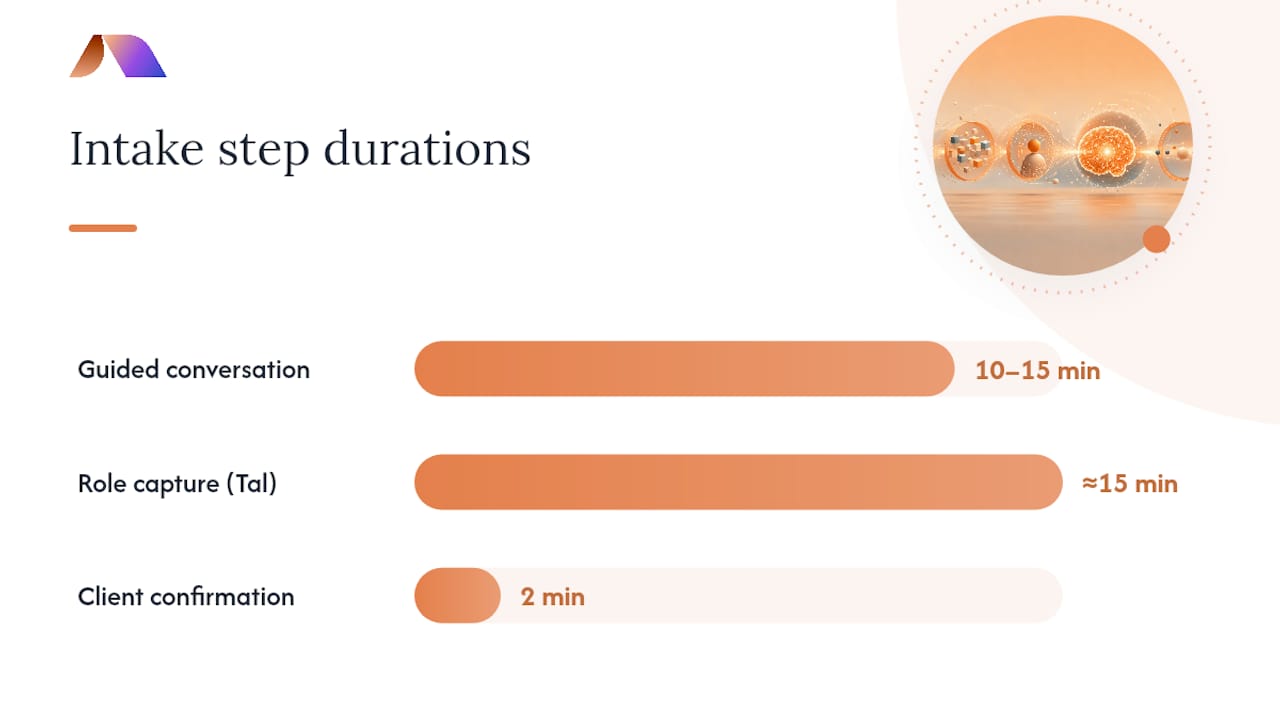
Guided conversation: the AI agent (chat or voice) asks a structured set of questions, branches based on answers, and probes for missing context. A well-designed agent completes this in 10–15 minutes. Tal captures role context in roughly 15 minutes, flags internal inconsistencies, and produces a confirmed brief before sourcing begins.
Live qualification and enrichment: the system scores the submission against predefined criteria (budget range, timeline, must-haves), checks for contradictions, and can pull in existing client records or benchmarks to fill gaps. ZeroTwo’s recruiting intake tool converts intake transcripts into a role brief and screening rubric, surfacing stakeholder misalignments that would otherwise surface mid-project.
Routing and brief generation: the LLM summarizes the conversation into a structured document, maps it to the right owner, and pushes it to the workspace. Tasks and downstream automations activate from that point.
The workflow drawn simply: trigger → form/chat → automation platform → LLM prompt → workspace doc → owner notification. Every step after the client hits submit is automated. The project owner opens ClickUp or Google Docs and finds a formatted brief with next actions already created.
Neudash’s five-stage structured intake model adds a client confirmation step before the brief is finalized, which reduces rework when the AI misread an ambiguous answer. That confirmation gate costs two minutes and prevents a bad brief from entering the pipeline.
What features should you look for in an AI intake solution?
Not every tool that calls itself an AI intake solution delivers the same capabilities. The must-haves are non-negotiable if you want a brief that is actually usable:
Adaptive NLP prompts that branch based on prior answers, not a fixed question sequence
Native integrations across the full stack: form/chat tool → automation platform → LLM → workspace
Summarization and extraction that pulls out requirements, deal-breakers, and open questions into labeled fields
Routing logic that maps submissions to the right owner based on project type, client tier, or geography
Human handoff and edit flow so a reviewer can correct the AI draft before it becomes the official brief
Audit logging for compliance: who submitted what, when the brief was generated, and what edits were made
The nice-to-haves add speed and polish without being blockers for a first pilot:
Voice-fill for clients who prefer to speak rather than type
Role-specific templates (legal matter, creative brief, staffing requisition) that preload relevant questions
Scoring rubrics that rate brief completeness before it reaches the project owner
Built-in SLA notifications that alert the owner if a brief sits unreviewed past a threshold
Workspace-native AI (ClickUp Brain, for example) that can summarize and act on briefs inside the tool where work already lives
Practically, the stack most teams build looks like this: Jotform or a similar form tool for the intake interface, Zapier or Make as the automation layer, OpenAI/ChatGPT as the LLM, and ClickUp or Google Docs as the workspace destination. Jotform’s client intake AI agent template gives you a starting point that covers essential client information across service types without building from scratch.
Where does AI intake produce the clearest wins by industry?
The core pattern (conversation → qualification → brief) applies across industries, but the intake questions, compliance constraints, and output formats differ meaningfully.
Legal (plaintiff practices): AI intake chatbots triage case type, capture incident details, and run a preliminary conflict check before a paralegal touches the file. Law firms using AI for intake report improved conversion during plaintiff intake workflows and faster time-to-engagement. The constraint: privileged communications rules mean intake transcripts must be stored with the same controls as client files, and any AI vendor must sign a BAA-equivalent agreement.
Marketing and creative agencies: AI intake captures campaign objectives, audience, channels, budget, and approval chain in one pass, producing a creative brief that meets internal completeness standards before the kickoff call. Teams that automate creative briefs with ChatGPT eliminate the manual brief-writing step entirely.
Staffing and recruiting: structured intake reduces submittal-to-interview ratios. Neudash reports that a disciplined intake process can move that ratio from roughly 5:1 to roughly 3:1, cutting wasted sourcing effort significantly. The intake captures must-haves, deal-breakers, and compensation range before a recruiter opens a single resume. For teams building out AI-assisted sourcing, automating candidate sourcing with AI is the natural next step after intake is wired.
Healthcare: AI intake pre-screens appointment type, symptom category, and insurance information, routing patients to the right provider or care pathway. HIPAA applies to any health data collected — intake tools must be HIPAA-compliant, and PHI cannot transit an LLM API that lacks a Business Associate Agreement.
Financial advisory: intake captures risk tolerance, investment horizon, and existing holdings before the first advisor call. Domain-specific constraints (Reg BI, fiduciary duty) mean the intake must disclose that AI is processing the information and must not constitute investment advice. For a deeper look at compliance considerations in this space, AI in financial advisory covers what advisors need to know.
How do you implement AI intake from pilot to production?
A pilot takes days, not months. The sequence below is designed to get a working intake running in under a week, then scale it based on what you learn.
Pilot timeline (days 1–7)
Define scope (Day 1): pick one intake type (one service line, one client tier). Do not try to automate everything at once.
Build the intake (Days 1–2): create a 6–10 question form or AI chat using Jotform or a similar tool. Include: project type, deliverables, timeline, budget range, must-haves, deal-breakers, and success criteria.
Choose your automation platform (Day 2): Zapier or Make both connect form submissions to OpenAI and to ClickUp/Google Docs. Make handles more complex branching; Zapier is faster to configure for simple linear flows. An AI workflow design guide can help you map triggers and branching logic before you build.
Write the prompt template (Days 2–3): see the template section below.
Map outputs (Day 3): define which LLM output fields map to which workspace fields. Brief title, client name, deliverables, constraints, and next actions are the minimum.
Run with three clients (Days 4–7): use real submissions, not test data.
Measure (Day 7): score completion rate, time-to-brief, draft quality, and follow-up volume.
Roles and responsibilities
Role | Responsibility | Owner |
|---|---|---|
Pilot owner | Defines scope, monitors KPIs, approves go/no-go | Operations lead or account manager |
Form builder | Designs intake questions and branching logic | Project manager or ops analyst |
Automation engineer | Wires form → automation → LLM → workspace | In-house or BRDGIT fractional engineer |
Prompt engineer | Writes and iterates the LLM prompt template | Automation engineer or AI specialist |
Reviewer | Scores draft brief quality and logs edits | Senior account lead or department head |
Production checklist
Data retention policy documented (how long intake data is stored, where, and who can access it)
Human review gate in place before brief is marked final
Activity logging enabled on the automation platform
Fallback path defined (what happens if the LLM call fails or returns a malformed output)
Staff training completed (see the training section below)
Copy-paste prompts, form schema, and automation wiring
This section gives you the assets to build. Copy, adapt, and use them directly.
Sample intake form schema
LLM prompt template (copy-paste ready)
Automation wiring steps
Trigger: form submission event in Jotform (or ClickUp Forms) fires a webhook to Zapier or Make.
Map fields: each form field maps to a named placeholder in the prompt template above.
Call the LLM: send the assembled prompt to the OpenAI Chat Completions API (model: gpt-4o or equivalent). Set temperature to 0.3 for consistent, structured output. Set max tokens to 1,000–1,500 to prevent runaway responses.
Parse the JSON response: extract each key from the returned JSON.
Create the workspace doc: use the Zapier/Make ClickUp or Google Docs connector to create a new document, populate it with the parsed fields, and assign it to the project owner.
Notify: send a Slack or email notification to the owner with a direct link to the brief.
Pro Tip: Enforce output schema by including the exact JSON key names in your prompt and adding a validation step in your automation that checks for all seven required keys before the doc is created. If a key is missing, route the submission to a human review queue rather than creating an incomplete brief.
For teams evaluating which LLM to use, a comparison of ChatGPT alternatives covers the tradeoffs across models if OpenAI is not the right fit for your stack.
When to bring in BRDGIT fractional engineers versus running the Zapier/Make pilot in-house: if your intake involves sensitive data (health, legal, financial), requires custom API integrations beyond standard connectors, or needs prompt engineering at scale across multiple service lines, fractional engineering support pays for itself in avoided rework. A straightforward single-service-line pilot with standard tools is well within reach for an in-house ops team.
What privacy and compliance rules apply to AI intake?
Client data flowing through an AI intake system touches multiple regulatory frameworks depending on your industry. The controls below apply regardless of sector.
Data minimization and consent:
Collect only the fields you will actually use to generate the brief. Every extra field is a liability.
Disclose in the intake interface that AI is processing the responses. A one-sentence notice at the top of the form satisfies this in most contexts.
Obtain explicit consent where required — healthcare and legal clients in particular expect it.
Security controls:
Encrypt data in transit using strong security protocols (TLS 1.2 or higher) and at rest on every platform in the chain.
Store API keys in a secrets manager (AWS Secrets Manager, HashiCorp Vault), never in plain text in automation workflows.
Apply role-based access controls so only authorized team members can view raw intake submissions.
Enable activity logging on your automation platform and retain logs per your data retention policy.
US-specific legal considerations:
HIPAA: any intake that collects protected health information requires a Business Associate Agreement with every vendor in the chain (form tool, automation platform, LLM provider). OpenAI offers a BAA for qualifying enterprise accounts.
Legal privilege: law firm intake transcripts are potentially privileged. Store them with the same access controls as client files and confirm your AI vendor’s data handling terms before processing.
Contract clauses: add a data processing addendum to your vendor agreements that specifies the purpose of processing, data retention limits, and breach notification timelines.
For financial advisory intake, compliance considerations specific to that domain go deeper on Reg BI and fiduciary disclosure requirements.
How do you measure whether AI intake is working?
Five KPIs tell you whether the pilot is succeeding or needs adjustment.
Intake completion rate: percentage of clients who submit a complete intake. A well-designed conversational intake should outperform a long static form on this metric.
Time-to-brief: minutes from form submission to a formatted brief in the workspace. A working automation should produce a brief in under two minutes.
Follow-up clarification reduction: count the clarification messages sent after brief receipt. A good brief should cut this significantly compared to your baseline.
Brief quality score: internal reviewer rating (1–5) on the first AI draft. Target an average of 4 or above after the first iteration of the prompt.
Time saved per project: estimated hours recovered from manual brief writing and back-and-forth email.
Pilot outcome rubric
Cost items to budget:
Form/chat tool subscription (Jotform paid plans start at a modest monthly fee; check current pricing)
Automation platform (Zapier Starter or Make Core; costs scale with task volume)
LLM API spend (charges are per token; a 1,000-token brief costs a fraction of a cent at current rates)
Integration labor or BRDGIT fractional support for initial wiring
Staff training time (typically two to four hours for a team of five)
Ready-to-run checklist and next steps
You have everything you need to start. Here is the minimum viable sequence.
Minimum viable intake checklist:
Build a 6–10 question intake form using the schema above
Write the LLM prompt template with your service-specific fields
Wire form → Zapier/Make → OpenAI → ClickUp/Google Docs
Set up owner notification
Define your four pilot KPIs and baseline them before launch
Run the pilot with three real clients
Score results against the rubric above
Iterate the prompt before scaling
Ordered next steps for your team:
Identify the pilot owner (operations lead or senior account manager).
Pick your integration stack: Jotform + Zapier + OpenAI + ClickUp covers most teams.
Write the prompt template using the copy-paste version above as a starting point.
Set your four KPIs and document the current baseline.
Run the pilot with three clients over five to seven days.
Score the pilot against the rubric. Iterate or scale based on results.
If the pilot surfaces integration complexity, sensitive data handling, or prompt engineering needs beyond the team’s capacity, engage BRDGIT for fractional engineering support.
For teams deciding whether intake should be the first workflow they automate, choosing your first back-office workflow offers a practical framework for making that call.
What BRDGIT has learned from intake implementations
The most common blocker we see is not technical. It is organizational. Teams spend weeks debating the perfect intake form while the actual problem — no structured brief, no consistent handoff — continues to cost them hours every week. The form does not need to be perfect. It needs to exist, run, and produce something better than what you have now.
Three specific patterns show up repeatedly. First, missing stakeholder sign-off: the person who owns the brief quality is not involved in designing the intake, so the AI produces a brief that satisfies the form builder but not the person who has to act on it. Fix this by having the brief reviewer approve the intake schema before you build. Second, unclear decision criteria: teams build intake questions without defining what a “good” brief looks like, so the quality score is subjective and the prompt never improves. Define your acceptance criteria first, then write questions that surface them. Third, overcomplicated forms: a 25-question intake is not more thorough — it is a completion rate disaster. Six focused questions with smart branching outperform twenty generic ones every time.
Pro Tip: Add one question that most teams skip: “Why is this project or role needed right now?” The answer almost always reveals a hidden constraint — a deadline tied to a board decision, a budget that expires, a competitor move — that changes how you scope and prioritize the work.
When to engage BRDGIT’s fractional engineers: systems integration across multiple platforms, prompt engineering at scale across service lines, or any intake that handles sensitive data (health, legal, financial) where compliance controls need to be built into the automation, not bolted on afterward.
BRDGIT builds AI intake systems that produce results in weeks
Most teams that contact BRDGIT have already tried a DIY intake pilot. They got the form working, the automation mostly fires, and the brief is “pretty good.” What they want is a system that is reliable, compliant, and scalable — one that a new account manager can use on day one without reading a manual.
BRDGIT’s fractional engineers design and wire AI intake systems end-to-end: intake form design, prompt engineering, automation wiring (Zapier, Make), workspace integrations (ClickUp, Google Docs), and compliance controls for sensitive industries. Engagements start with a rapid 2–4 week pilot with defined KPIs, so you know exactly what you are getting before committing to a longer retainer. No guesswork about whether it will work — you see the brief quality, the completion rate, and the time-to-brief numbers from real client submissions before the pilot closes.
Book an AI readiness assessment or fractional engineering engagement with BRDGIT to scope your intake pilot and get a working system in production within weeks.
Sources
Client Job Intake Automation for Recruitment Agencies | Neudash
A business analysis professional’s foundation for success (BABOK) | IIBA



