


Published on
What Is AI Review Response Automation, and Should You Use It?
AI review response automation uses artificial intelligence to draft or publish replies to customer reviews so teams can respond faster and more consistently than manual processes allow. It works best for businesses with recurring review volume, defined brand voice, and clear rules for when a human needs to step in before anything gets posted.
Before you decide whether it fits your operation, three things matter most:
Speed and consistency at scale. The software can draft responses in seconds instead of the hours a busy manager might take between shifts.
Suitability depends on volume. A single location with a handful of reviews a month gains little; a franchise or multi-location retailer with hundreds of reviews weekly gains a lot.
Governance is non-negotiable. Every credible deployment includes human sign-off rules for sensitive cases, not blanket auto-posting.
Review responsiveness itself carries weight with customers. Businesses that reply to most of their reviews are seen as more trustworthy, and that trust signal shows up in buying decisions before a customer ever calls or walks in.
Key Takeaways
AI review response automation succeeds when speed and consistency are paired with strict human oversight for sensitive cases and a brand voice trained on real examples.
Point | Details |
|---|---|
Start with definition and fit | Automation drafts or posts replies using sentiment and context analysis; it suits businesses with recurring review volume. |
Know the core components | Connectors, NLP sentiment and topic analysis, response generation, and a rule engine work together in every credible system. |
Pilot before scaling | Enable drafts with human approval first, and reserve auto-posting for low-risk, high-confidence cases only. |
Escalate the risky categories | Refunds, legal threats, safety issues, and personal information should always route to a named human owner. |
Measure the right numbers | Track response rate, average response time, escalation rate, and sentiment trend to prove the business case. |
Table of Contents
What Is AI Review Response Automation Made Of?
How Does AI Respond to Reviews, Step by Step?
What Business Benefits Come From Automating Customer Reviews?
How Do You Roll Out Review Response Automation Safely?
What Governance Rules Keep Automation From Backfiring?
Who Gets the Most Value From Review Automation?
Getting From Curiosity to a Safe Rollout
What This Means for Your Next Step
Sources
What Is AI Review Response Automation Made Of?
Before you evaluate any tool, you need to know the vocabulary vendors will throw at you. The category has settled around a handful of core components, and understanding them separates an informed buyer from someone who just clicks “yes” on a demo.
Connectors and unified inboxes. These pull reviews from wherever they land, Google Business Profile, Facebook, Yelp, and industry-specific platforms, into a single dashboard. Without this layer, someone still has to check five different logins every morning.
Natural language processing components. Sentiment analysis scores whether a review is positive, negative, or mixed. Topic modeling identifies what the review is actually about: wait times, staff friendliness, product defects, pricing complaints. This is the layer that turns raw text into structured signal.
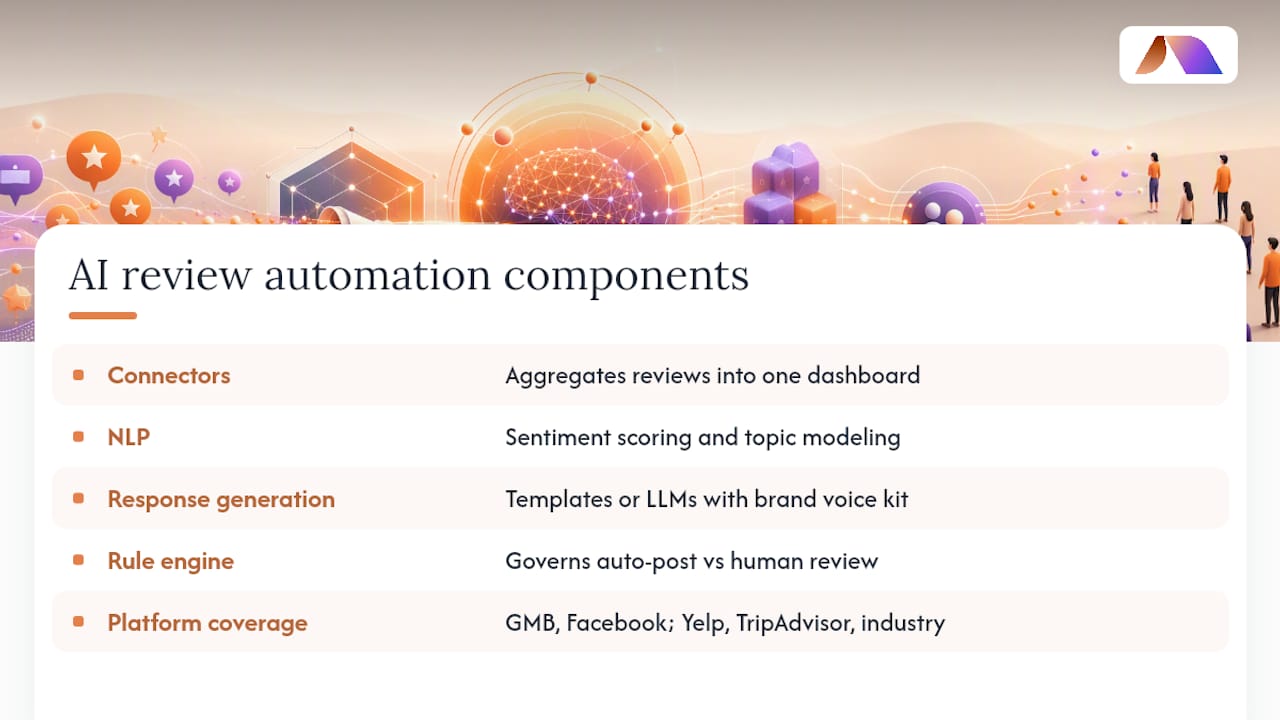
Response generation. Some systems rely on templates filled with variables (customer name, product mentioned). More advanced platforms use large language models paired with a brand voice kit, a set of guidelines and sample phrases that keep the tone consistent with how your business actually talks. An AI review response typically analyzes sentiment, star rating, and surrounding context before drafting or publishing a reply that matches that trained tone.
The rule engine. This is the governance layer. It decides whether a drafted reply gets auto-posted, held for human review, or escalated entirely. Rule engines commonly separate simple, positive reviews (safe to auto-post) from negative or sensitive ones, which get queued for human review instead.
Platform coverage. Most tools support Google Business Profile and Facebook at minimum, with Yelp, TripAdvisor, and industry-specific sites (like healthcare or hospitality directories) added depending on the vendor. Coverage gaps here are a common reason pilots stall.
Knowing these five pieces means you can ask a vendor sharper questions than “does it work with AI,” and you’ll spot the difference between a genuinely capable system and one running on templates alone.
How Does AI Respond to Reviews, Step by Step?
The mechanics are more straightforward than the marketing copy suggests. Here’s the actual flow from an incoming review to a published reply:
Ingest. The system pulls the new review through its connector, capturing the star rating, text, reviewer name, and platform of origin.
Analyze. Sentiment analysis scores the tone, while topic extraction flags what the review discusses, service speed, a specific product, a refund request, a safety concern.
Map to context. The system matches the review’s signals to a response category. A five-star review mentioning “friendly staff” maps to a warm thank-you template. A one-star review mentioning “refund” or “lawyer” maps to an escalation path instead.
Generate the draft. The AI writes a response using your brand voice kit, pulling phrasing and tone from the sample replies you provided during setup.
Apply the rule. The rule engine makes the final call: post immediately, queue for approval, or route to a specific team member.
The signals doing the heavy lifting are usually simple on paper. Star rating thresholds (anything under three stars typically triggers review), and keyword flags for words like “refund,” “lawsuit,” “allergic,” or “injury” that indicate legal or safety exposure. Language detection matters too. A system trained mainly on English text can produce awkward or tone-deaf replies to reviews written in Spanish or French if it isn’t built to detect and switch languages properly.
One detail that surprises a lot of business owners: the best systems don’t post instantly. Automated responses are often configured with time delays so replies appear a few hours after the review, mimicking how a real person would actually respond during business hours. Instant, robotic-feeling timing is one of the fastest ways to tip customers off that nobody’s actually reading their feedback.

Audit logs round out the technical picture. Every draft, edit, and approval should be timestamped and stored, both for quality control and for defending your process if a response is ever challenged.
Pro Tip: Set your keyword escalation list before you turn anything on. Words like “refund,” “injury,” “discriminate,” and “lawyer” should route straight to a human, no exceptions, regardless of the star rating attached.
What Business Benefits Come From Automating Customer Reviews?
The most obvious gain is speed. Response times that used to stretch across days can shrink to hours, and staff who once spent thirty minutes a day drafting replies get that time back for higher-value work.
The reputation gains run deeper than they first appear. Customers researching a business read owner responses as a proxy for how much that business cares, and responding to most reviews correlates directly with perceived trustworthiness. On top of that, active, keyword-rich responses on Google Business Profile tend to support local search visibility, since Google’s local algorithm weighs engagement signals like response rate.
There’s a strategic layer many teams miss entirely: aggregated review data becomes a source of operational intelligence. If forty reviews in a month mention slow checkout, that’s not just reputation management, it’s a flag for operations. The category around this kind of automation is expanding fast, with AI-driven customer service tools including review response projected to grow at a 25.8% compound annual rate through 2030, which tells you this isn’t a niche experiment anymore.
Track these metrics to know whether your automation is actually working:
Response rate, the percentage of reviews that get any reply at all.
Average response time, from review posted to reply published.
Escalation rate, how often the rule engine correctly routes a review to a human.
Sentiment trend, whether overall review tone is improving, flat, or declining month over month.
How Do You Roll Out Review Response Automation Safely?
A pilot-first approach beats a full rollout every time. Vendors and practitioners alike recommend starting small, enabling AI-generated drafts with human approval before you ever flip on auto-posting, and reserving auto-post for the lowest-risk cases only.
Here’s the sequence that actually works in practice:
Audit your review sources. List every platform where reviews appear, estimate monthly volume on each, and identify who currently owns responses.
Build your brand voice kit. Document your tone, banned phrases, and required disclaimers before any AI touches a single review.
Connect your platforms. Set up OAuth or API access to centralize Google Business Profile, Facebook, Yelp, and any other relevant channels into one inbox.
Train the model. Seed the system with 5 to 10 example responses covering your common scenarios. This step matters more than most teams expect, since vendors consistently recommend this sample size to get tone-matching right from day one.
Configure your rules. Set star-rating thresholds for auto-post eligibility, define queue rules for anything ambiguous, and build your escalation trigger list.
Pilot on low-risk replies first. Start with five-star reviews only, monitor for errors, and collect every human edit made to AI drafts. Those edits are gold for refining the model.
Scale deliberately. Expand into three and four-star reviews once accuracy holds steady, add more platforms, and set a recurring reporting cadence, weekly at minimum during the first quarter.
A few practical notes make the difference between a smooth rollout and a scramble:
Assign a single named owner for escalated reviews so nothing sits unanswered in a queue.
Review your brand voice kit quarterly. Tone drifts as your business changes, and the AI won’t catch that on its own.
Keep your first auto-post threshold conservative. Four stars and above with no flagged keywords is a reasonable starting line.
Document every rule change so you can trace why a specific review got the response it did.
Pro Tip: Run your pilot for at least 30 days before expanding auto-post eligibility. A shorter window won’t surface the edge cases, sarcastic five-star reviews, reviews mentioning competitors by name, that trip up even well-trained models.
Teams evaluating this kind of automation often look at it alongside broader AI reporting automation work, since the underlying pattern, structured signals feeding automated action, shows up across a lot of operational tooling, not just reviews.
What Governance Rules Keep Automation From Backfiring?
Automation without guardrails is how businesses end up apologizing for a chatbot’s tone-deaf reply to a genuinely serious complaint. Human-in-the-loop review isn’t optional for certain categories, and any deployment worth trusting builds this in from day one.
Reviews that mention refunds, legal threats, safety incidents, or personal information exposure should always route to a named human, never auto-post, regardless of how the sentiment score reads. A five-star review can still contain a phone number or medical detail that shouldn’t be published in a public reply. Escalation triggers need to catch that too.
Tone control matters just as much as escalation logic. Your brand voice kit should explicitly forbid certain promises, discounts the AI isn’t authorized to offer, guarantees about outcomes, anything that could be read as a binding commitment. This is the same discipline that applies when personalizing customer experience with AI more broadly: consistency has to be paired with limits, or the system will eventually say something you can’t walk back.
Robust deployments separate routine positive reviews, safe to auto-post, from high-risk categories like refunds, safety, legal exposure, or personal information. The latter route to named human owners with clear response-time expectations, while time delays and complete audit trails add both authenticity and a compliance record if a response is ever challenged.
Keep these controls in place from the start:
Maintain a written list of reviews that always require human sign-off, refunds, legal language, safety complaints, and anything mentioning a named employee.
Store every draft, edit, and approval with a timestamp, not just the final published reply.
Review your escalation list monthly and add new trigger words as they surface in real reviews.
Assign SLA expectations to escalated reviews so they don’t sit unanswered for days.
A surprising number of implementation failures trace back to skipping this governance layer entirely, a pattern covered in detail in common AI implementation mistakes that businesses make when they rush deployment ahead of the rules that should contain it.
Who Gets the Most Value From Review Automation?
Franchises, multi-location retailers, hospitality groups, and high-volume ecommerce sellers see the clearest return, largely because their review volume makes manual response genuinely unsustainable. A single restaurant getting three reviews a week doesn’t need this. A 40-location service business getting three hundred doesn’t have a choice.
Reasonable KPI targets to aim for once your pilot stabilizes:
Response rate above 75% across all connected platforms.
Average response time under 24 hours, even for lower-priority reviews.
A measurable drop in manual reply hours, tracked weekly against your pre-automation baseline.
The operational intelligence angle deserves more attention than it usually gets. When review topics get aggregated across locations, patterns emerge that a single manager scanning reviews one at a time would never catch, a specific product defect showing up across three regions, or a staffing gap at a particular time of day. That kind of pattern recognition, covered in more depth in guides on AI feedback analysis tools, turns review response from a customer service task into an early warning system for the rest of the business.
Getting From Curiosity to a Safe Rollout
BRDGIT works with teams moving from “we should probably automate this” to an actual working system, and the path that holds up is consistent: readiness assessment first, then a pilot, then fractional engineering support to tune and scale what’s working.
BRDGIT’s engagements in this space typically produce:
A documented brand voice kit with sample responses and forbidden phrases.
An escalation playbook naming who owns which category of sensitive review.
A realistic automation roadmap sequencing platforms and rule expansion over time.
The teams that sustain results aren’t the ones who set it up once and walk away. They revisit the rules quarterly, retrain the voice kit as the business evolves, and treat the fractional support relationship as ongoing tuning rather than a one-time setup fee.
What This Means for Your Next Step
Businesses that treat AI review response as pure time-savings usually undersell it. The real payoff shows up when review data feeds back into operations, when a spike in complaints about a specific product becomes a signal for procurement, not just a batch of replies to draft.
Conventional advice tends to jump straight to “turn on auto-post and save time.” That’s backwards. The businesses getting this right start with governance: who owns escalations, what never gets auto-posted, how tone gets trained before volume scales. Speed without those guardrails is how a single bad automated reply ends up screenshotted and shared far beyond the original review.
Prioritize the pilot. Thirty days of drafts-only, human-approved responses will teach you more about your edge cases than any vendor demo. Once that data exists, scaling is a rules problem, not a technology problem, and that’s a much easier problem to solve well.
— Team BRDGIT
Sources
AI Review Responses vs. Manual: High-Converting Examples for 2026 — Vendasta
How AI review response is changing customer service automation — Thryv
How reviews and ratings affect clients’ buying decisions — Forbes



