


Published on
What AI in Payroll Processing Means for Staffing Firms
AI in payroll processing automates repetitive payroll tasks, flags anomalies before they become check errors, extracts data from tax and onboarding documents, and turns payroll from a monthly chore into a running feed of workforce intelligence. For staffing firms, that shift matters because payroll runs weekly, involves hundreds of contingent workers with shifting assignments, and carries real compliance exposure at every jurisdiction line. A 2024 Gartner survey found that 58% of finance functions were already using AI in some form, and payroll is one of the fastest-moving corners of that trend.
Pro Tip: Start by asking where your payroll team spends the most manual hours each week. That’s your first pilot, not the flashiest AI feature on a vendor’s slide deck.
Here’s what changes for a staffing firm that adopts AI in payroll well:
Fewer manual timesheet corrections and pay disputes
Faster payroll close, which speeds client invoicing and cash flow
Reduced tax and compliance risk across multi-state placements
More recruiter and account manager time spent on clients, not spreadsheets
A payroll dataset that can predict staffing demand instead of just recording history
Organizations running AI-powered payroll systems report an average 69% reduction in total monthly payroll errors, with mature systems reaching prediction accuracy near 92% for workforce planning, according to PYMNTS. BRDGIT works with staffing and services firms to turn that potential into a working pilot rather than a stalled pilot project.
The one-line verdict: if your payroll team is still manually reconciling timesheets and chasing tax form errors, AI is no longer an experiment. It is the baseline your competitors are already running.
Key Takeaways
AI in payroll processing works for staffing firms when it automates routine validation and document work while routing exceptions to trained staff with clear ownership.
Point | Details |
|---|---|
Define the core capability set | AI validates timesheets, extracts documents, detects anomalies, and monitors tax rules automatically. |
Expect measurable error reduction | Mature AI payroll systems report error reductions near 69% and prediction accuracy near 92%. |
Target staffing-specific KPIs | Track on-time timesheet rates, hours saved, invoice accuracy, and time-to-close payroll. |
Choose integration based on risk | Vendor-native tools like SAP SuccessFactors offer low effort; custom AWS-based agents offer more control. |
Start with BRDGIT’s readiness path | BRDGIT scopes a low-risk pilot through readiness assessment and fractional AI engineering support. |
Table of Contents
What AI Actually Does in Payroll Processing
How Staffing Firms Apply AI to Payroll Workflows
Benefits and KPIs to Track for AI-Enabled Payroll
Fitting AI Into Your Existing Payroll Tech Stack
Building Your AI Payroll Implementation Roadmap
How BRDGIT Approaches AI Adoption in Staffing Payroll
Sources
What AI Actually Does in Payroll Processing
AI in payroll processing is a set of narrow, well-defined capabilities, not a single black box that “does payroll.” Here’s what shows up in a working system today.
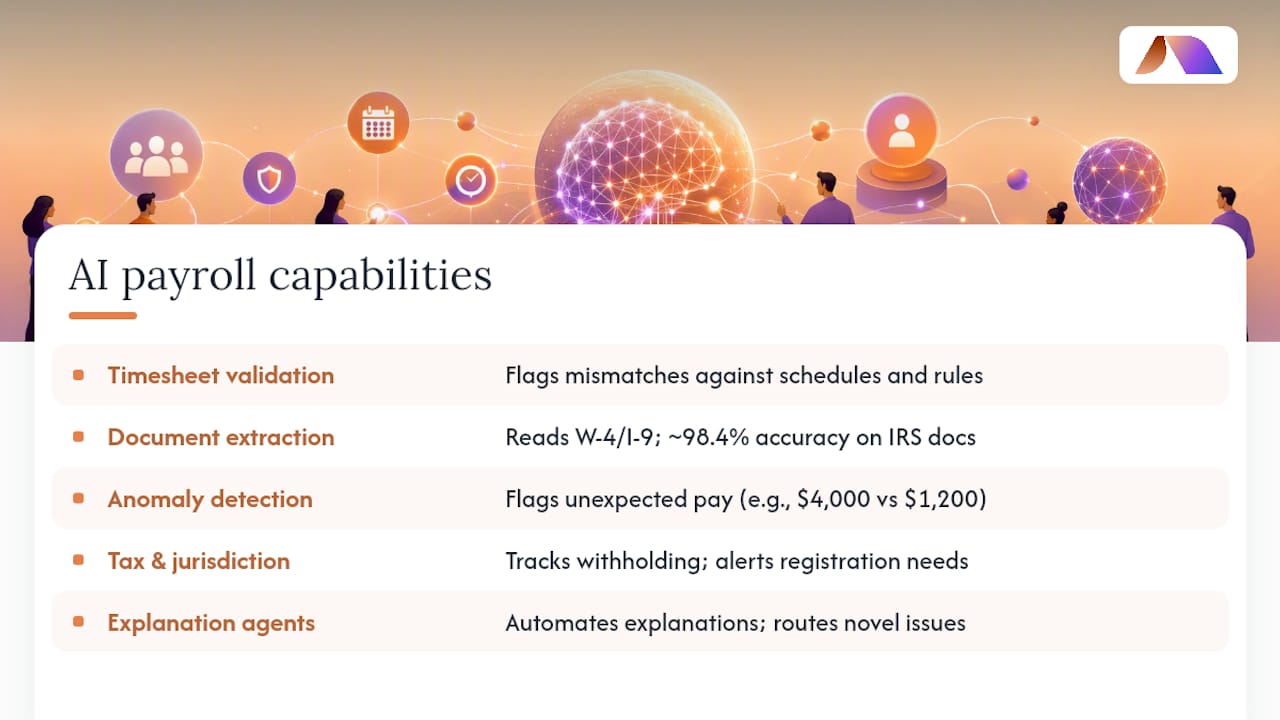
Timesheet validation and reconciliation. AI cross-checks submitted hours against schedules, client rules, and overtime thresholds, flagging mismatches before a payroll clerk ever touches the file.
Intelligent document extraction. Tools like Google Cloud Document AI and Vertex AI read W-4s, I-9s, and state tax forms, pulling structured data with reported accuracy near 98.4% on standard IRS documents in research testing. That replaces manual keying, which is where a large share of payroll errors originate.
Anomaly and duplicate-pay detection. Models learn typical pay patterns per role and client, then flag a $4,000 check where $1,200 was expected.
Tax and jurisdiction rule monitoring. As contingent workers cross state lines on assignment, AI tracks which withholding rules apply and alerts when a placement triggers a new registration requirement.
Explanation agents for pay queries. SAP’s newly announced Payroll Agents automate pay explanations and alert resolution directly inside the payroll system, with one early adopter projecting a substantial reduction in the cost of handling payroll questions.
Automated file generation. Once a run is validated, AI builds the output files payroll engines, banks, and ACH processors need, with no manual reformatting.
What AI still doesn’t do well: interpreting a genuinely novel legal question, negotiating a disputed client bill rate, or deciding how to handle a worker’s unique tax situation. Those stay with your team, and any credible AI system should route them there automatically instead of guessing.
How Staffing Firms Apply AI to Payroll Workflows
The value shows up when you map these capabilities onto the actual path a timesheet takes from submission to invoice.
Timesheet collection and approval. AI-integrated portals send reminders and auto-flag missing entries before the deadline instead of after.
Payroll data prep. Hours, rates, and client billing codes reconcile automatically against the assignment record.
Payroll run validation. The system checks totals, tax withholding, and benefit deductions before the run finalizes, not after checks go out.
Invoice generation. Validated payroll data feeds directly into client invoices, cutting the lag between a worked shift and a billed dollar.
Gross-margin reporting. Because pay and bill rates now sit in one clean dataset, margin visibility updates in near real time instead of at month end.
Worker queries and disputes. Routine questions (“why is my check different this week?”) get answered by an explanation agent; genuine disputes route to a human.
The payoff is measurable. AI-integrated timesheet portals with automated reminders can lift on-time submission from roughly 70 to 80% up to 90 to 95%, and back-office automation can eliminate 8 to 15 hours of weekly manual labor at a typical $5 to 20 million staffing firm, according to Glacier Lake Partners.
Pro Tip: Map your current timesheet-to-invoice process on paper before automating anything. You’ll usually find two or three manual handoffs that were never actually necessary.
Risk profile matters here too. A healthcare staffing desk with credentialing and shift-differential pay needs tighter exception handling than a light-industrial desk running flat hourly rates. Complexity should shape pilot scope, not the other way around.
Benefits and KPIs to Track for AI-Enabled Payroll
The business case for AI in payroll rests on a small set of numbers you should be watching from day one of a pilot.
Payroll error rate: target a meaningful drop from baseline; mature deployments report reductions near 69%
Time-to-close payroll: measure days from period end to final approval
On-time timesheet submission rate: watch for movement into the 90 to 95% range
FTE-hours saved in back office: the 8 to 15 hours per week figure from Glacier Lake Partners is a reasonable early benchmark for mid-sized firms
Invoice accuracy and cash-flow timing: faster, cleaner invoices mean faster collections
Gross margin visibility: how quickly you can see true margin per placement, not just at month-end close
An event-driven payroll architecture tested empirically significantly improved payroll processing accuracy while cutting monthly infrastructure cost substantially, per research published on ScienceDirect. That’s an infrastructure-level result, but it shows how far accuracy gains can go when automation and architecture improve together.
A realistic 3 to 6 month pilot target for a small staffing firm: cut manual timesheet corrections by half, shave one to two days off payroll close, and free up ten hours of back-office time weekly.
Fitting AI Into Your Existing Payroll Tech Stack
Most staffing firms don’t rip out their payroll system to add AI. They layer capability onto what’s already running, and the pattern you choose determines cost, risk, and how fast you can move.
Vendor-native AI agents. Platforms like SAP SuccessFactors now ship built-in payroll agents that handle explanations, alerts, and rule creation directly inside the system you already use. Lowest integration effort, but you’re limited to what the vendor ships.
API-based augmentation. You connect specialized AI services to your existing payroll engine through APIs, adding capability without replacing core infrastructure. Moderate effort, more flexibility.
Cloud document intelligence. Services like Google Cloud Document AI and Vertex AI handle extraction and classification tasks on top of any payroll system, often the fastest path to automating tax-form processing.
Custom agent workflows. Built on infrastructure like AWS, these handle firm-specific exception logic that off-the-shelf tools can’t. Highest effort, highest control.
Integration pattern | Expected benefit | Integration effort | Data & security considerations | Vendor maturity |
|---|---|---|---|---|
Vendor-native (SAP SuccessFactors) | Faster query resolution, fewer manual alerts | Low | Data stays inside existing vendor controls | High |
API augmentation | Added capability without system replacement | Moderate | Requires secure API auth and audit logging | Moderate to high |
Cloud document AI (Google Cloud Document AI, Vertex AI) | High-accuracy extraction from tax forms | Moderate | Document data leaves core system briefly; needs encryption in transit | High |
Custom agents (AWS-based) | Tailored exception handling at scale | High | Requires full access-control and audit design | Varies by build |
Whatever pattern you pick, payroll data needs role-based access controls, full audit logs on every automated decision, and encryption both at rest and in transit. AWS guidance on event-driven payroll patterns recommends running compute only during actual payroll windows, which controls cost on a workload that’s naturally bursty rather than constant.
Pro Tip: Ask any vendor exactly where payroll data lives during processing, not just where it’s stored afterward. That gap is where most compliance risk hides.
Building Your AI Payroll Implementation Roadmap
A working rollout follows a sequence, not a leap. Here’s the order that holds up in practice.
Assess data readiness. Can your current system export clean, structured timesheet and pay data? If not, fix that first.
Map the workflow. Chart every handoff from timesheet submission to invoice, noting where humans currently intervene.
Scope a low-risk pilot. Pick one desk or one client account, not your whole book of business.
Set success metrics before you start. Error rate, hours saved, and time-to-close, defined up front.
Design human-in-the-loop routing. Every exception needs a clear owner and a defined resolution SLA, a point Glacier Lake Partners stresses as essential to operationalizing AI in payroll.
Run a security review. Confirm access controls and audit logging before any data moves.
Plan the rollout. Expand desk by desk once pilot metrics hold.
A realistic timeline: 0 to 90 days for a contained pilot on one desk, then 3 to 6 months to scale across the firm if metrics hold. Common pitfalls include scoping the pilot too broadly, failing to define where exceptions route, and skipping change management with the recruiters and account managers whose daily workflow actually changes.
Pro Tip: *Automate the exceptions-routing logic before you automate the happy path.
If your team lacks in-house AI engineering capacity, an AI readiness assessment or fractional engineering support closes that gap without a full-time hire.
How BRDGIT Approaches AI Adoption in Staffing Payroll
BRDGIT works with staffing and services firms through a defined path: a readiness assessment first, then a strategy and roadmap, then implementation through workflow automation, custom agents, or fractional AI engineering depending on what the firm actually needs.
That order matters. Firms that redesign workflow around AI, rather than just cleaning up data and hoping automation follows, see the larger gains, a pattern documented in staffing-industry research. BRDGIT builds pilots around that principle: small scope, clear exception routing, measurable targets.
Readiness assessments that identify your highest-friction payroll workflow first
Fractional AI engineers who build and maintain custom automation without a full-time hire
Change management support for the recruiters and account managers whose day-to-day shifts
Pro Tip: *Automate exceptions-first, not last.
Payroll AI succeeds when it’s scoped to a specific workflow, measured against clear metrics, and supported by people who’ve built these systems before.
Full details live at Brdgit.
What Changes for Your Team Once AI Handles Routine Payroll
Less time keying data, more time on exceptions. That’s the honest summary. A payroll clerk’s morning used to start with a stack of timesheets; now it starts with a dashboard showing three flagged discrepancies and a prioritized action list. Recruiters and account managers get their time back for candidates and clients instead of chasing missing hours. It requires new skills, mainly knowing when to trust the system and when to override it, and new handoff points between AI and staff. That’s a cultural shift as much as a technical one.

Get Help Adopting AI in Your Payroll Workflow
If you’re staring at a payroll process that eats a full week of staff time every month, the fastest path forward isn’t another software subscription. It’s a clear-eyed readiness assessment that tells you exactly where AI will actually save time, versus where it won’t help at all. BRDGIT builds that assessment around your real workflow, then provides the fractional AI engineering to implement it, without the cost or delay of a full-time hire.
A staffing firm running a lean back office doesn’t need a six-figure software overhaul to get started. It needs one well-scoped pilot with the right people building it. If you want that pilot mapped out, start with a conversation about fractional AI engineering support built around your actual payroll workflow, not a generic template.



