


Published on
Ship a Reliable Custom AI Agent: Start Small, Instrument Everything
A custom AI agent is a system built around a large language model that plans, calls tools, and executes multi-step workflows on its own, unlike a chatbot or a standard LLM app that only responds to a single prompt without controlling execution. The right starting point for most teams is one narrow, specialized agent with explicit tool contracts and full tracing from day one. Expect a working prototype relatively quickly and budget accordingly before you scale to anything more complex.
TL;DR:
Starting with a single, specialized agent handling one main task is more manageable and easier to debug than building a complex multi-agent system upfront.
Defining clear tool contracts and explicit instructions before development significantly reduces failures and improves the reliability of AI agents.
Properly implementing guardrails like input validation, rate limiting, retries, and audit logging is essential to prevent costly failures and maintain operational safety.
Monitoring should include task completion rates, tool call accuracy, latency, cost, and drift detection to ensure ongoing agent performance and relevance.
Using a phased approach, including discovery, prototyping, iteration, and careful production deployment, helps control costs and build effective, scalable AI agents.
Table of Contents
When Should You Build a Custom AI Agent?
The Core Building Blocks: Model, Instructions, Tools, and Memory
Single-Agent, Manager-Worker, or Multi-Agent: Which Pattern Fits?
Low-Code, Managed Builders, or Code-First SDKs: Choosing Your Approach
Building a Custom AI Agent: A Practical Step-by-Step Workflow
Guardrails, Approval Flows, and Safe Failure Modes
Tracing, Logging, and Testing: How to Keep Agents Reliable
Deploying and Scaling a Custom AI Agent in Production
What Does a First Production Agent Actually Cost and Take?
How BRDGIT Approaches Custom Agent Projects
Which Metrics Actually Tell You If Your Agent Is Working?
Data Privacy and Security When Building AI Agents
Integrating Agents With the Systems You Already Run
Where Custom AI Agents Are Headed Next
Our Take: Start Small, Instrument Everything
Get Fractional AI Engineers on Your Agent Project
Where to Go Deeper on Agent Development
Sources
When Should You Build a Custom AI Agent?
Not every workflow deserves an agent. I’ve watched engineering teams pour weeks into agentizing a process that was broken long before any model touched it, and the AI just made the dysfunction faster and harder to trace.
The candidates worth pursuing share four traits: they involve multiple sequential steps, they require some form of judgment or decision branching, they repeat often enough to justify the build cost, and you can measure the return in hours saved or errors avoided. A one-off task doesn’t clear that bar. Neither does a process nobody has bothered to document.
Some of the highest-value early use cases we see across manufacturing, distribution, and professional services include:
Retrieval-augmented assistants that answer questions against internal documents, specs, or policy manuals instead of forcing staff to search four different systems.
Research agents that pull data from multiple sources, cross-reference it, and produce a structured summary for a human to review.
Orchestration agents that route tickets, approvals, or requests across departments based on content and urgency.
The warning sign to watch for: a workflow with messy, inconsistent, or poorly labeled underlying data. Agents amplify whatever process they sit on top of. If the inputs are unreliable, the agent’s output will be unreliable at machine speed instead of human speed, which is a worse problem, not a better one.
The Core Building Blocks: Model, Instructions, Tools, and Memory
Every functional agent, regardless of industry or use case, is built from the same four components. Miss one, and the whole system gets fragile fast.
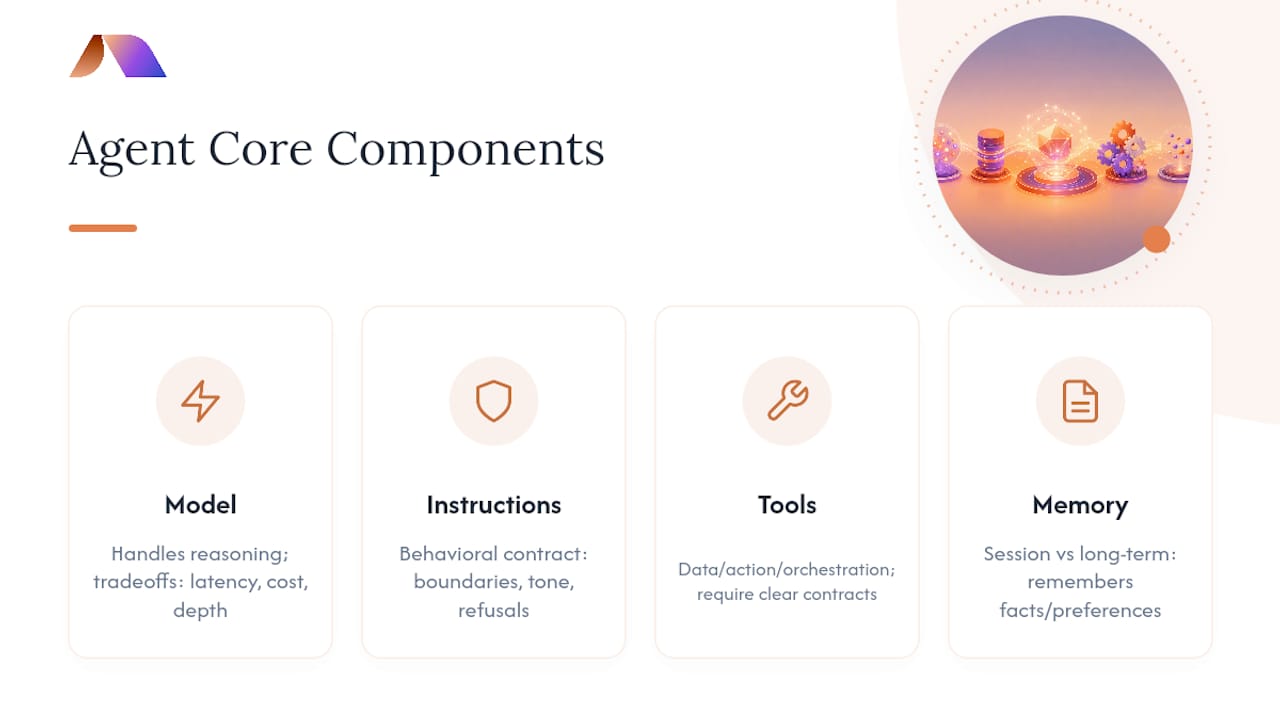
The model handles reasoning. Choosing it means weighing latency, cost per call, and reasoning depth against the task. A routing decision doesn’t need the same horsepower as a multi-step research task, and paying for that horsepower everywhere is how agent projects quietly blow their budgets.
System instructions define the agent’s behavior, boundaries, and tone. Treat these as a behavioral contract, not a suggestion. Vague instructions produce inconsistent agents; specific ones with explicit refusal conditions produce predictable ones.
Tools let the agent act, whether that means querying a database, hitting an API, or writing to a file system. Tools generally fall into three categories: data tools (read-only lookups), action tools (writes and side effects), and orchestration tools (calls to other agents or subprocesses). Every tool needs a clear contract before you write a line of orchestration code.
Memory determines whether the agent remembers anything between turns or tasks. Session memory covers a single conversation; long-term memory persists facts, preferences, or state across runs entirely.
According to OpenAI’s guidance on agent architecture, these four elements, the model, instructions, tools, and memory, form the minimum viable structure for any agent that does real work rather than just chatting.
Pro Tip: Write your tool contracts before you write any orchestration logic. If you can’t describe a tool’s inputs, outputs, and failure modes in a paragraph, the agent can’t use it reliably either.
Single-Agent, Manager-Worker, or Multi-Agent: Which Pattern Fits?
Most teams overbuild their first agent. The instinct is to design for scale before proving the concept works at all, and that instinct costs weeks.
OpenAI’s own guidance is blunt about this: start with a single, narrow agent, and add orchestration only when the workflow complexity actually demands it. A single specialized agent handling one clear job is easier to test, debug, and explain to stakeholders than a distributed system nobody fully understands.
Once a single agent hits its ceiling, usually because a task naturally splits into distinct sub-skills, the manager-worker pattern is the next logical step:
A manager agent breaks the incoming request into subtasks and decides which specialist should handle each one.
Worker agents, sometimes framed as “agents as tools,” execute narrow tasks and return structured results.
The manager synthesizes those results into a final output or triggers the next action.
Full multi-agent orchestration, where several agents negotiate, hand off context, and operate somewhat independently, helps when tasks genuinely require parallel specialization, like one agent researching while another drafts. It also introduces real complexity: state synchronization, handoff failures, and harder debugging.
Whichever pattern you choose, define the run lifecycle explicitly: what starts a run, what conditions end it successfully, and what happens on timeout or repeated tool failure. A run without a defined exit condition is a run that can loop indefinitely and burn budget doing it.
Pro Tip: If you can’t draw your agent’s handoff logic on a whiteboard in under two minutes, it’s too complex for a first production release.
Low-Code, Managed Builders, or Code-First SDKs: Choosing Your Approach
Three broad paths exist for building agents, and the right one depends on how much control you need versus how fast you need to ship.
Low-code platforms like n8n let teams wire up agent logic with prebuilt templates for retrieval, web scraping, and basic multi-agent patterns. This route wins when speed matters more than deep customization, and when the integration touches systems you already have connectors for. It’s also often the fastest path into broader workflow automation for teams that haven’t automated much of anything yet.
Managed agent builders sit a level up in abstraction. They accelerate the path to production by handling infrastructure, hosting, and much of the orchestration plumbing for you, at the cost of constraining how deeply you can customize behavior or swap components later.
Code-first SDKs, including OpenAI’s Agents SDK and Google’s Agent Development Kit, give you full observability, testability, and control over every part of the stack. This is the route for teams that need version-controlled agent definitions, custom tracing, or deployment portability across environments.
When evaluating any platform, check three things specifically:
How well it integrates with the tools and APIs you already run in production.
Whether it gives you real tracing, not just a dashboard that shows “success” or “failure.”
What its security and credential-handling model looks like under the hood.
Building a Custom AI Agent: A Practical Step-by-Step Workflow
There’s a repeatable rhythm to shipping an agent that actually survives contact with production, and skipping steps here is where most projects lose months.
Discovery. Map the workflow end to end, define the success metric in concrete terms (time saved, error rate reduced, tickets resolved), and confirm you have real access to the data the agent will need. A workflow mapping exercise at this stage catches half the problems you’d otherwise discover in week six.
Tool contract and instruction design. Before any code gets written, define every tool’s inputs, outputs, error cases, and rate limits, and draft the system instructions that govern the agent’s behavior. This is tedious and it’s also the single highest-leverage step in the whole process, since weak tool specs are a leading cause of agent failures.
Prototype. Build the smallest version that could possibly work: one tool, one capability, one end-to-end run from trigger to output. Resist the urge to add a second tool until the first one is solid.
Iterate. Add automated tests for each tool call, insert human approval checkpoints at the riskiest steps, and build explicit error handling for every failure mode you can anticipate, and a few you can’t.
Deploy. Choose your runtime, lock down credentials with least-privilege access, and set network rules that limit what the agent can reach even if something goes wrong upstream.
The discovery phase deserves more respect than it usually gets. A proper readiness assessment before development starts surfaces the data gaps and process ambiguities that would otherwise show up as production incidents.
Pro Tip: Ship the prototype with exactly one tool connected, even if the final agent needs five. You’ll learn more from watching one tool fail in the real world than from designing five tools in a whiteboard session.
Guardrails, Approval Flows, and Safe Failure Modes
Agents fail. The question that determines whether that failure costs you an afternoon or an incident report is whether you designed for it in advance.
Start with tool-level contracts that sanitize every input before it reaches an external system. An agent that passes unvalidated user text straight into a database query or an API call is a liability waiting for the wrong prompt.
Human-in-the-loop checkpoints matter most at the highest-stakes steps: anything involving money, customer communication, or irreversible actions should route through an approval gate rather than executing autonomously. This isn’t a lack of trust in the model, it’s basic operational hygiene that any serious software system would have regardless of what’s making the decisions.
Beyond approvals, a handful of guardrails carry most of the weight:
Rate limiting on every tool to prevent runaway loops from hammering an API or database.
Retry logic with backoff, paired with a deterministic fallback when retries exhaust, so the agent fails to a known safe state instead of an unpredictable one.
Audit logs on every tool call and decision, both for debugging and for compliance requirements in regulated industries.
Policy enforcement at the tool layer, not just the prompt layer, since prompt-level restrictions alone are easier to circumvent than most teams expect.
None of this is exotic engineering. It’s the same discipline you’d apply to any system that touches production data and real money, just applied to a system that makes some of its own decisions along the way.
Tracing, Logging, and Testing: How to Keep Agents Reliable
You cannot debug what you cannot see, and agents that operate as black boxes are the ones that quietly erode trust with the teams using them.
A minimum viable trace set captures every tool call with its input parameters, the decision rationale behind it, a snapshot of context at that moment, and the final run outcome. Structured traces like this let you replay a run and pinpoint exactly where reasoning went sideways, rather than guessing from a final output that looks wrong.
Version-controlled agent definitions matter for the same reason version control matters for any code: you need to know what changed between the run that worked and the run that didn’t.
The teams that debug fastest treat this like software engineering from the start:
Unit tests for individual tool calls, verifying inputs and outputs against the contract.
Integration tests that run the full agent loop against realistic scenarios, including deliberately malformed inputs.
Ongoing monitoring for error rates, tool miscalls, latency spikes, and signals that suggest hallucinated outputs.
Practitioners consistently point to observability and explicit tool contracts as the difference between agent projects that ship and ones that stall in endless debugging cycles.
Deploying and Scaling a Custom AI Agent in Production
Getting an agent to work in a demo and getting it to survive production traffic are different engineering problems entirely.
A managed runtime handles hosting, scaling, and much of the infrastructure burden for you, trading some control for speed. A self-hosted loop gives you full control over the execution environment, at the cost of owning the infrastructure work yourself. Neither is universally right; it depends on your team’s existing DevOps capacity.
Whichever you choose, sandbox the agent’s execution environment and containerize it so a failure in one run can’t cascade into your broader systems. Apply least-privilege network rules so the agent can only reach the specific endpoints its tools actually need, nothing more.
As usage grows, a few scaling tactics consistently pay off:
Move memory and vector stores to infrastructure that scales independently from the agent’s compute, so a spike in one doesn’t starve the other.
Cache repeated retrievals instead of hitting the same data source on every run.
Summarize conversation context before model calls to cut token costs on long-running sessions.
Use smaller, cheaper models for routine routing decisions, and reserve larger reasoning models for the steps that genuinely need them.
Cost control and reliability tend to move together here. A well-cached, well-summarized agent is usually also a faster, more predictable one.
What Does a First Production Agent Actually Cost and Take?
Three cost drivers dominate almost every agent project: model compute and API usage, the engineering time spent on integrations, and the ongoing investment in testing and observability infrastructure. None of these are optional line items you can skip to save money without paying for it later in debugging time.
A realistic phase breakdown for a first production agent looks something like this:
Discovery and tool contract design: one to two weeks, longer if the underlying workflow isn’t well documented yet.
Prototype build: one to three weeks for a single-tool, single-capability agent.
Iteration and testing: two to four weeks, depending on how many edge cases and approval flows the workflow requires.
Deployment and initial monitoring: one to two weeks to stabilize in production.
The choices you make early shift this timeline more than anything else. Starting with a low-code platform or managed builder can compress the prototype phase significantly, while opting for a fully custom code-first build extends it in exchange for more control down the line. Reusing an existing tool contract library and investing in tracing from the first prototype, rather than bolting it on later, are the two levers most likely to cut both cost and timeline in half.
How BRDGIT Approaches Custom Agent Projects
BRDGIT starts every agent engagement with a readiness check, because attempting to automate a workflow that’s already broken almost always produces a faster, more expensive version of the same problem. Our checklist covers data quality, process documentation, and whether success is actually measurable before any development begins. That discipline is what separates agent projects that ship from ones that stall in permanent pilot mode.
Which Metrics Actually Tell You If Your Agent Is Working?
Standard software metrics don’t capture what matters for an agent, since the interesting failures happen inside the reasoning, not just at the input or output.
Task completion rate is the obvious starting point: what percentage of runs reach a successful exit condition without human intervention? But that number alone is misleading without a second metric tracking how often the agent needed a human to step in, since a high completion rate propped up by constant manual correction isn’t actually success.
Tool-call accuracy matters separately from task completion. An agent can complete a task while still calling the wrong tool, passing malformed parameters, or retrying unnecessarily, and each of those inflates cost even when the final output looks fine.
Latency per run and cost per run both need tracking against a baseline, ideally the time and cost of the manual process the agent replaced. An agent that’s technically more “capable” but three times slower or five times more expensive than the process it replaced isn’t a win no matter how impressive the demo looked.
Finally, track drift over time. An agent’s tool APIs change, underlying data shifts, and model providers update their models, all of which can quietly degrade performance between releases. Regular replay of historical traces against the current agent version catches this before customers do.
Data Privacy and Security When Building AI Agents
Every tool you connect to an agent is a new access point into your systems, and agents by design touch more of your infrastructure than a typical application does.
Start by scoping credentials narrowly. An agent that only needs to read from a customer database should never hold write access, and an agent handling internal documents shouldn’t share credentials with one that touches customer-facing systems. Least-privilege access isn’t a nice-to-have here, it’s the difference between a contained incident and a serious one.
Sanitize and validate every input before it reaches a tool, particularly inputs that originate from external users rather than internal staff, since prompt injection attempts specifically target the gap between what a model interprets and what a tool actually executes.
Log access to sensitive data separately from general operational traces, and make sure those logs are reviewable for compliance purposes in regulated industries like legal or healthcare-adjacent services. If your agent touches personally identifiable information, decide upfront whether that data needs to persist in memory at all, or whether it can be processed and discarded within a single run.
Network segmentation matters as much as credential scoping. An agent’s execution environment should only be able to reach the specific endpoints its tools require, nothing on your broader internal network by default.
Integrating Agents With the Systems You Already Run
The hardest part of most agent projects isn’t the model, it’s connecting that model cleanly to the systems your business already depends on.
Start by treating every integration as a tool with a formal contract, the same way you’d treat an internal API. That means defined inputs, outputs, error codes, and rate limits, whether the integration is to a CRM, an ERP system, or an internal ticketing tool. Skipping this step and letting the agent interact with a legacy system’s raw API is how you end up debugging failures nobody can reproduce.
For systems with modern REST or GraphQL APIs, integration is usually straightforward. Older systems without clean APIs often need a thin wrapper service that translates agent tool calls into whatever that legacy system actually understands, a small investment that pays off in maintainability.
Authentication deserves its own plan. Service accounts with scoped permissions are safer than reusing a human user’s credentials, and they make audit logs far easier to interpret when something goes wrong.
Where Custom AI Agents Are Headed Next
Agent architectures are still evolving quickly, and a few directions are worth watching if you’re planning a build now versus in another year.
Standardized protocols for tool discovery and agent-to-agent communication are gaining traction, which should eventually reduce the custom integration work every team currently duplicates. Multi-agent orchestration frameworks are also maturing fast, with better native support for handoffs, shared context, and failure recovery than what was available even a year ago.
On the model side, smaller specialized models are becoming viable for routine agent tasks like routing and classification, which lowers the cost curve for running agents at scale. Expect more teams to run a mix of model sizes within a single agent system rather than paying premium reasoning-model prices for every step.
Observability tooling is catching up to the complexity of multi-agent systems, with better replay and root-cause analysis features emerging specifically for agentic workflows rather than adapted from traditional application monitoring. That shift alone should meaningfully cut the debugging time that currently eats a large share of agent development budgets.
Our Take: Start Small, Instrument Everything
The teams that succeed with agents treat this as software engineering with an unpredictable component bolted on, not a magic layer that skips the discipline. Start with one narrow agent, instrument it heavily, and expand only when the data tells you to. If your team lacks the bandwidth to do that properly in-house, fractional engineers who’ve shipped this before are usually the faster, cheaper path to a working system than a slow internal hire.
— Team BRDGIT
Get Fractional AI Engineers on Your Agent Project
BRDGIT is the alternative to a slow internal hire or a bloated agency retainer for teams that need a custom AI agent shipped without the six-month ramp-up. You get experienced fractional engineers who run the readiness assessment, build a working pilot, handle the production implementation, and stay on for monitoring, all scoped to what your team actually needs rather than a fixed package.
That means you skip the trial-and-error most in-house teams go through on their first agent build, since our engineers have already made those mistakes on other projects and know which tool contracts and guardrails matter from day one. If your team has a workflow that’s a strong candidate for automation, but you don’t have the internal bandwidth to build it right, BRDGIT’s fractional engineers can start with an assessment and move straight into a pilot. Reach out to scope your first agent project and see what a realistic timeline looks like for your specific workflow.
Where to Go Deeper on Agent Development
For hands-on implementation details beyond this guide, OpenAI’s agent building guide and Agents SDK docs cover runtime and tracing specifics. Google’s ADK documentation and n8n’s agent docs offer code-first and low-code reference examples worth bookmarking while you build.



