


Published on
What Does AI Workflow Mapping Mean for Your Business?
AI workflow mapping is the practice of documenting every step in a business process where AI touches work: the triggers that start it, the data that feeds it, the models that process it, the thresholds that route it, and the humans who catch what the model cannot. Done right, it is not a one-time diagram. It is a living operational asset that must be updated as models drift, volumes shift, and business rules change. Nearly two-thirds of organizations now view AI adoption as a strategic priority, according to Harvard Business Review. Without a map, that strategy has no floor plan.
Pro Tip: Before you touch any AI tool, write out the process on paper first. If you cannot describe the trigger, the decision logic, and the fallback in plain English, you are not ready to automate it.
The map captures: triggers, input formats, preprocessing steps, AI model roles, decision thresholds, human handoffs, outputs, audit logs, and monitoring metrics.
It doubles as a governance document, a pilot scope definition, and a training reference for new team members.
BRDGIT works with teams at exactly this stage: turning process knowledge into a structured, pilotable map before any engineering begins.
Table of Contents
How do AI workflows differ from traditional rule-based automation?
Why map AI workflows at all?
How do you build an AI workflow map step by step?
A checklist and the pitfalls that derail most first maps
Key Takeaways
The gap between mapping and actually shipping
BRDGIT helps you map, pilot, and scale AI workflows
Useful sources and further reading
How do AI workflows differ from traditional rule-based automation?
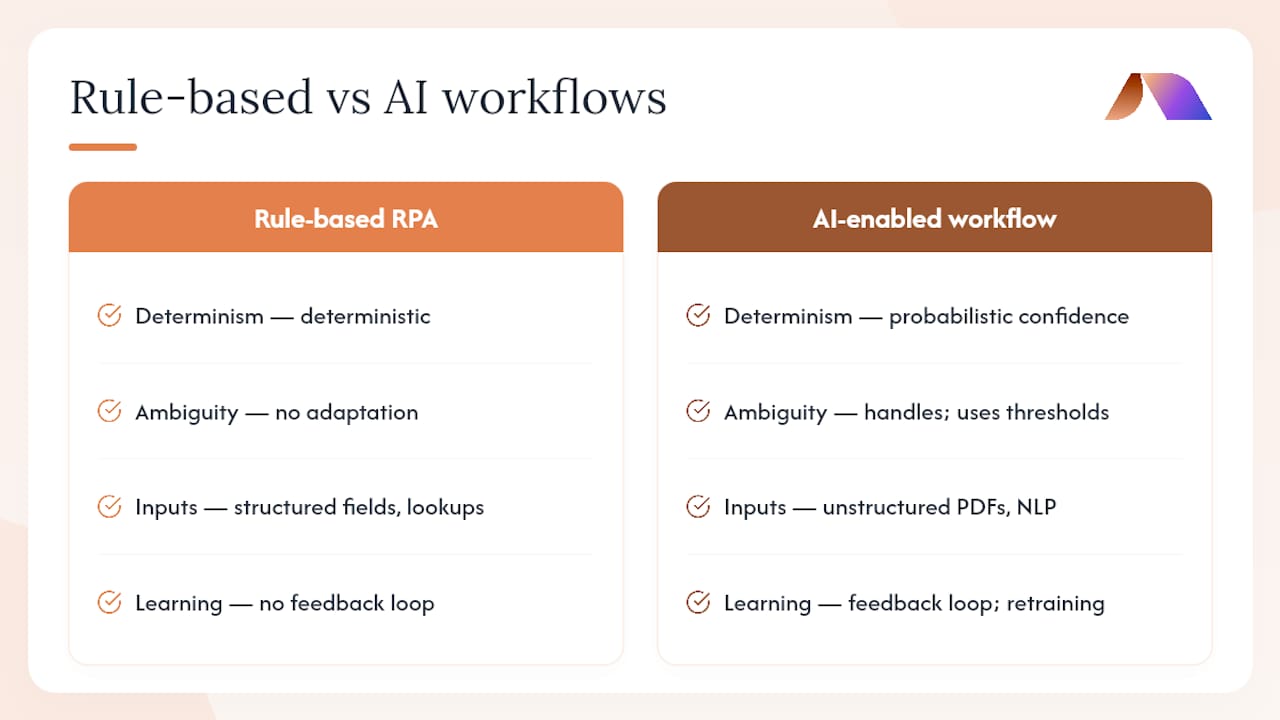
A traditional automation follows a fixed script. If invoice total is above $10,000, route to manager. Always. No learning, no adaptation, no ambiguity. An AI workflow embeds a model — machine learning, NLP, or generative AI — into one or more of those steps, which means the output is probabilistic, not deterministic. The model might classify a support ticket with varying confidence scores. What happens at 61% is a design decision, not a default.
Adobe Acrobat’s workflow guide describes the core stages as data input, processing and analysis, decision or action, and output with feedback. That feedback loop is what separates AI workflows from static RPA scripts: the system is expected to improve, which means the map must account for retraining cycles.
“Workflows are controlled by code and orchestrators. Agents are controlled by the AI itself. Workflows are preferable when steps can be defined, tested, and debugged in advance.” ZeroLabs, What Are AI Workflows?
Consider invoice processing. A rules-based system checks field values against a lookup table. An AI-enabled version reads unstructured PDFs, extracts line items, flags anomalies, and routes exceptions to a human reviewer when confidence falls below a set threshold. The CRM or ERP receives the clean output either way, but the path through the workflow is fundamentally different. Orchestration engines like Apache Airflow or Prefect coordinate those steps; the map tells the team what each engine is coordinating.
Pro Tip: If your process has fewer than three decision branches and zero ambiguous inputs, rules-based RPA is probably faster and cheaper. Reserve AI for steps where the input varies and judgment is required.
Why map AI workflows at all?
Mapping reduces scope risk before a single line of code is written. It reveals whether the underlying process is standardized enough to automate, which data sources are actually available, and where human judgment is genuinely irreplaceable. Larridin’s workflow mapping research shows that most enterprises run AI workflows without formal measurement, which means they cannot connect usage to business value or identify which workflows to scale.
The business case for mapping is concrete:
Fewer failed pilots because readiness gaps surface before engineering begins.
Faster development cycles because engineers receive a clear spec, not a verbal description.
Cleaner compliance posture because audit requirements are designed in, not retrofitted.
Measurable ROI tied to accuracy, TAT reduction, and cost per transaction.
Common use cases where mapping pays off quickly: customer support ticket triage, invoice processing and exception handling, content operations and review queues, supplier communication workflows, and field-team assistance for inspections and reporting.
“A workflow map surfaces utilization, bottlenecks, and candidates to scale while connecting AI usage to business value.” Larridin, AI Workflow Mapping 101
How do you build an AI workflow map step by step?
Start with a single high-volume process, map its current state completely, then design the AI layer on top of what you actually have. Sanity’s AI workflow guide is direct on this: pick one high-volume task, define success metrics before you build, and only add complexity when metrics prove value.
Identify the candidate process. Use volume, repetition, and error rate as selection criteria. A prioritization prompt can help surface the highest-value targets.
Step field | What to capture |
|---|---|
Trigger | Event, source, schedule |
Owner | Role responsible for this step |
Input types | Format, schema, source system |
Model used | Name, version, task |
Expected output | Format, destination, SLA |
Threshold | Confidence score or rule condition |
Fallback | Action when threshold not met |
Pro Tip: Set your confidence threshold conservatively in the pilot. It is far easier to lower the human-review bar after proving accuracy than to recover trust after a batch of bad outputs.
A checklist and the pitfalls that derail most first maps
First-map checklist:
[ ] Trigger defined with source system and frequency
[ ] All input types and schemas documented
[ ] AI model role, version, and confidence threshold specified
[ ] Human handoff conditions and SLA named
[ ] Exception and fallback paths mapped
[ ] Audit logging fields and storage location confirmed
[ ] Success metrics set before pilot launch
[ ] Rollback criteria defined
Common pitfalls and corrections:
Skipping current-state mapping. Teams jump to AI design without documenting what humans actually do. Fix: spend one week on current-state documentation before any AI design work.
Ignoring edge cases. The map covers the happy path only. Fix: run a structured exception-finding session with the team that handles the process daily.
Poor sampling for the pilot. The test dataset does not reflect real production variance. Fix: pull a random sample across at least four weeks of historical data.
Unclear success metrics. The pilot ends with no agreed definition of “good enough.” Fix: write the success criteria into the map before engineering begins.
Missing governance components. Audit logs and human-review thresholds are added as an afterthought. Fix: treat governance as a required map section, not an optional appendix.
Key Takeaways
An AI workflow map is the foundational document that makes AI automation predictable, governable, and measurable — without it, pilots fail silently and compliance gaps compound.
Point | Details |
|---|---|
Map before you build | Document the current-state process completely before designing any AI step. |
Governance is structural | Audit logs, human-in-the-loop thresholds, and bias monitoring belong in the map, not added after deployment. |
Pilots need metrics first | Set accuracy, TAT, and cost targets before launch; rising escalation rates signal model drift. |
The map is never finished | Update it after every pilot cycle, model version change, or significant volume shift. |
BRDGIT accelerates the path | BRDGIT’s readiness assessments and fractional engineers help teams build, pilot, and govern AI workflow maps without a full-time hire. |
The gap between mapping and actually shipping
Most organizations that struggle with AI adoption are not short on ambition or budget. They are short on specificity. A workflow map forces the kind of specificity that exposes whether a process is actually ready for AI or whether it first needs standardization, better data, or clearer ownership. That is uncomfortable to discover, but it is far less expensive than discovering it six months into an engineering project.
There is also a tendency to treat the map as a deliverable rather than infrastructure. A diagram produced in a workshop and filed in a shared drive is not a living document. It is a historical artifact. The teams that get durable value from AI workflow mapping are the ones that assign an owner to the map itself, schedule quarterly reviews, and update it when production metrics drift. That discipline is unglamorous. It is also what separates organizations that scale AI from those that perpetually pilot it.
Scaling AI agents requires exactly this kind of documented foundation. Without it, each new workflow starts from scratch, and institutional knowledge lives in the heads of whoever ran the last project.
BRDGIT helps you map, pilot, and scale AI workflows
Mapping a workflow correctly the first time is faster with experienced practitioners in the room. BRDGIT starts every engagement with a structured AI readiness assessment that surfaces the highest-value automation candidates and the gaps that would derail a pilot. From there, BRDGIT’s fractional engineers work alongside your team to build the map, define success metrics, and deliver a scoped pilot with measurable outcomes, without the overhead of a full-time hire.
For teams that need ongoing support after the pilot, BRDGIT’s fractional model scales up or down based on what the project actually requires. No long-term contracts before value is proven. If you are ready to move from curiosity to a working AI workflow, start with BRDGIT’s fractional engineers and get a clear picture of where your first map should begin.
Useful sources and further reading
What is an AI workflow and how does it work? | Adobe Acrobat
AI Workflows: A Comprehensive Guide | Slack
AI workflows (Sanity glossary)
What Are AI Workflows? (The Practical Guide for Builders) | ZeroLabs
AI Workflow Mapping 101: Visualize and Optimize Every Business Process | Larridin
From paper to AI: the evolution of maps and what’s next | Forbes
AI maps: the digital infrastructure driving autonomous systems | GPSWorld



