


Published on
Build Scalable CRM Workflow Automation for Teams, Plus When to Add AI
CRM workflow automation replaces manual, repeatable CRM tasks like lead routing, follow-up emails, and record updates with rule-based flows that fire automatically. Use it any time a task follows the same steps more than a handful of times a week: new lead assignment, deal stage reminders, ticket escalation, data cleanup. The payoff is fewer missed follow-ups, cleaner data, and hours back for people who were previously doing this by hand.
TL;DR:
CRM workflow automation is best suited for processes that occur repeatedly more than a few times weekly, such as lead routing or data cleanup.
Designing reliable workflows requires precise trigger and enrollment logic, with safeguards like re-enrollment caps and suppression checks to prevent duplicates or spam.
Most effective automations focus on lead assignment, nurture sequences, deal reminders, ticket escalation, and data hygiene, which provide quick ROI with minimal complexity.
Scaling beyond native CRM workflows involves integrating multi-system data, predictive scoring, or AI-driven decision support, often requiring a thorough readiness assessment first.
Security and compliance demand strict access controls, audit trails, and adherence to data privacy obligations when automating customer data processes.
BRDGITTurn CRM Automation Into ExecutionBRDGIT helps teams identify AI opportunities, automate workflows, and build practical roadmaps for reliable execution.Explore BRDGIT
Table of Contents
What Is CRM Workflow Automation and How Does It Fit Inside a CRM?
What Are the Most Common CRM Workflow Types?
How Do CRM Workflows Actually Run Behind the Scenes?
How Do You Design, Build, and Publish a Workflow Safely?
What Metrics and Practices Keep Workflows Reliable?
When Should You Move Beyond Built-In CRM Workflows?
What Security and Compliance Steps Does Workflow Automation Require?
What Are the Common Challenges and Limits of CRM Workflow Automation?
What Do Advanced CRM Workflow Automation Scenarios Look Like?
Team BRDGIT Perspective: Practical Lessons From Deployments
How BRDGIT Helps Teams Build Automation That Goes Beyond the CRM
Sources
FAQ
What Is CRM Workflow Automation and How Does It Fit Inside a CRM?
CRM workflow automation is the engine that watches for a defined event, checks conditions against it, and then executes actions without a human clicking anything. Picture a sales rep who used to email every new lead manually within an hour of form submission. A workflow now does it the moment the form lands: it enrolls the record, checks the lead’s source and territory, and sends the right templated email while creating a task for the rep to call within 24 hours.
Every CRM workflow, regardless of platform, is built from the same handful of parts:
Triggers — the event that starts the process (a new record, a changed field, a scheduled time)
Enrollment — the rule that decides which records enter the workflow
Conditions — logic branches that route records down different paths
Actions — the actual work: emails, task creation, field updates, webhooks
Waits — timed delays or “wait until” pauses between steps
Automated CRM processes run rule-based logic to cut down on manual data entry, follow-ups, and record updates, and that basic architecture holds true whether the flow lives in the CRM itself or in a connected automation tool like an integration platform. In-CRM workflows have the advantage of native access to contact and deal data. External automation tools add reach into non-CRM systems but introduce another point of failure. Increasingly, CRMs also offer AI-assisted workflow generation, where you describe a goal in plain language and the system drafts a starting workflow. That draft still needs a human to check every action before it goes live.
What Are the Most Common CRM Workflow Types?
Most teams do not need fifty automations. They need eight or ten that hit the biggest time sinks. Here is where to start, roughly in order of impact:
Lead capture and routing. A form submission or inbound call triggers instant assignment based on territory, deal size, or product interest, so leads stop sitting in a queue overnight.
Nurture sequences and lead scoring. Contacts who download a resource or visit pricing pages get dripped relevant content while their score climbs, and once they cross a threshold, sales gets notified automatically.
Deal and pipeline automation. A deal sitting in “Proposal Sent” for more than seven days triggers a reminder task for the rep and a nudge notification for their manager.
Service and ticket triage. Incoming tickets get tagged by keyword or urgency, routed to the right queue, and escalated automatically if no one responds inside the SLA window.
Data hygiene and enrichment. Duplicate contacts get flagged, missing fields trigger enrichment lookups, and stale records get reassigned or archived on a schedule.
Back-office handoffs. A closed-won deal automatically creates a record in billing or provisioning systems, cutting the delay between “signed” and “delivered.”
Workflows like these run across marketing, sales, and service simultaneously to maintain data hygiene, route leads, and enforce SLAs, which is why the strongest automation programs treat these functions as one connected system rather than three separate silos. Field-based businesses see similar returns; teams managing dispatch and mobile crews get comparable benefits from AI tools built for field operations. For smaller operations still deciding where to start, quick wins like new-lead follow-up and appointment reminders tend to recover the most hours per week relative to setup effort.
How Do CRM Workflows Actually Run Behind the Scenes?
A workflow is only as reliable as its trigger and enrollment logic. Get those wrong and you either miss records that should have been caught or, worse, enroll the same contact five times and blast them with duplicate emails.
Triggers generally fall into four buckets:
Data-change triggers — a field updates (deal stage moves, status changes)
Event-based triggers — an action happens (form fill, email open, purchase)
Scheduled triggers — a time-based check (daily, weekly, on a specific date)
Webhook triggers — an external system pushes a signal into the CRM
Enrollment decides who enters the workflow when the trigger fires, and re-enrollment decides whether a record can enter again after it has already been through once. This is where a lot of workflows break. Advanced workflow editors let you set enrollment triggers, re-enrollment rules, and actions with granular control, and testing that logic before publishing is what separates a workflow that works from one that spams your contact list. Actions themselves range from internal updates (change a property, create a task) to external calls (fire a webhook, push data to an ERP or accounting system).
Pro Tip: Before publishing any workflow, ask what happens if the same record re-enters the trigger condition twice in one day. If the honest answer is “it would run again,” you need either a re-enrollment cap or a suppression check before the first action.
Reliable workflow engines build in idempotency keys, so an action that partially fails does not fire twice when the system retries it. That single feature is often the difference between a workflow that quietly self-heals and one that floods a customer’s inbox after a webhook timeout.
How Do You Design, Build, and Publish a Workflow Safely?
Building a workflow is fast. Building one that does not break in three weeks takes a checklist.
Define the objective and the metric before opening the editor. What does success look like: faster response time, fewer dropped leads, shorter ticket resolution? Write it down first.
Pick the narrowest enrollment trigger that works. A trigger scoped to “new leads from the contact form where region equals Northeast” is safer than “any new contact,” which will eventually catch records you never meant to enroll.
Design branches, timeouts, and a failure lane. Every wait step needs a maximum duration and a defined path if the expected response never arrives.
Use a template or AI-assisted draft as a starting point, not a finished product. AI generation can build a rough flow from a plain-language prompt, but every generated action needs manual review before publish, since AI-drafted workflows still require validation against your actual data model.
Run a dry test with a small sample. Enroll five to ten test records, watch the history log for every step, and confirm actions fire in the right order.
Publish, then monitor the first real enrollments closely. Check the workflow history for the first 24 to 48 hours rather than assuming it works because the test passed.
Know your rollback plan before you need it. Pausing a live workflow should be a one-click action, not a scramble.
Pro Tip: Map the objective on paper or in a shared doc before anyone touches the workflow editor. Teams that skip this step tend to build technically correct workflows that solve the wrong problem. If you are not sure which process to tackle first, a structured way to choose your first back-office workflow beats guessing.
What Metrics and Practices Keep Workflows Reliable?
Track four numbers on every workflow you run: enrollment rate (how many records actually enter), action success/failure rate, time-to-first-action, and conversion lift compared to a manual baseline. If enrollment is far higher or lower than expected, your trigger condition is probably too broad or too narrow.
Governance matters more as the workflow count grows. A naming convention that includes the trigger and purpose (e.g., “Lead Routing, Northeast, Form Fill”) saves hours of confusion six months later when someone has to audit forty active flows. Lock down who can create and publish workflows versus who can only view them, and require a second set of eyes before anything touches the full contact database.
Common failure patterns and how to catch them:
Duplicate sends — usually a re-enrollment setting left too permissive; add a suppression check or enrollment cap.
Webhook errors (4xx/5xx) — check authentication tokens and payload formatting first; these account for most integration failures.
Incorrect enrollments — almost always a condition that is broader than intended; test with edge-case records, not just clean ones.
Silent failures — set up alerts tied to the workflow history log so a broken action gets flagged instead of discovered a month later during a report review.
Retry-with-backoff logic, where a failed action waits progressively longer before trying again, prevents a temporary outage in a connected app from cascading into hundreds of failed actions.
When Should You Move Beyond Built-In CRM Workflows?
Built-in workflows handle linear, rule-based logic well. They struggle once you need judgment: prioritizing which of forty open deals actually needs attention today, summarizing a service ticket thread before routing it, or predicting which leads will convert based on a dozen weighted signals. That is where custom AI automation earns its cost, particularly for manufacturing and B2B teams juggling multi-step decisions that a simple if/then rule cannot capture.
Signals it is time to look past the native editor:
Your workflows require combining data from more than two or three systems to make a routing decision
You need predictive scoring or summarization, not just field matching
Non-technical staff can no longer safely edit workflows without breaking something
You are duplicating the same complex logic across multiple workflows instead of centralizing it
A practical approach is to engage through an AI readiness assessment first, mapping which processes are genuinely automatable versus which need a person in the loop, then build a roadmap before touching implementation. Whatever partner you use, require contractual clarity on data handling, a documented rollback plan, and a testing environment separate from production before signing anything. A clear map of what should be automated prevents half-built projects that stall six months in.
What Security and Compliance Steps Does Workflow Automation Require?
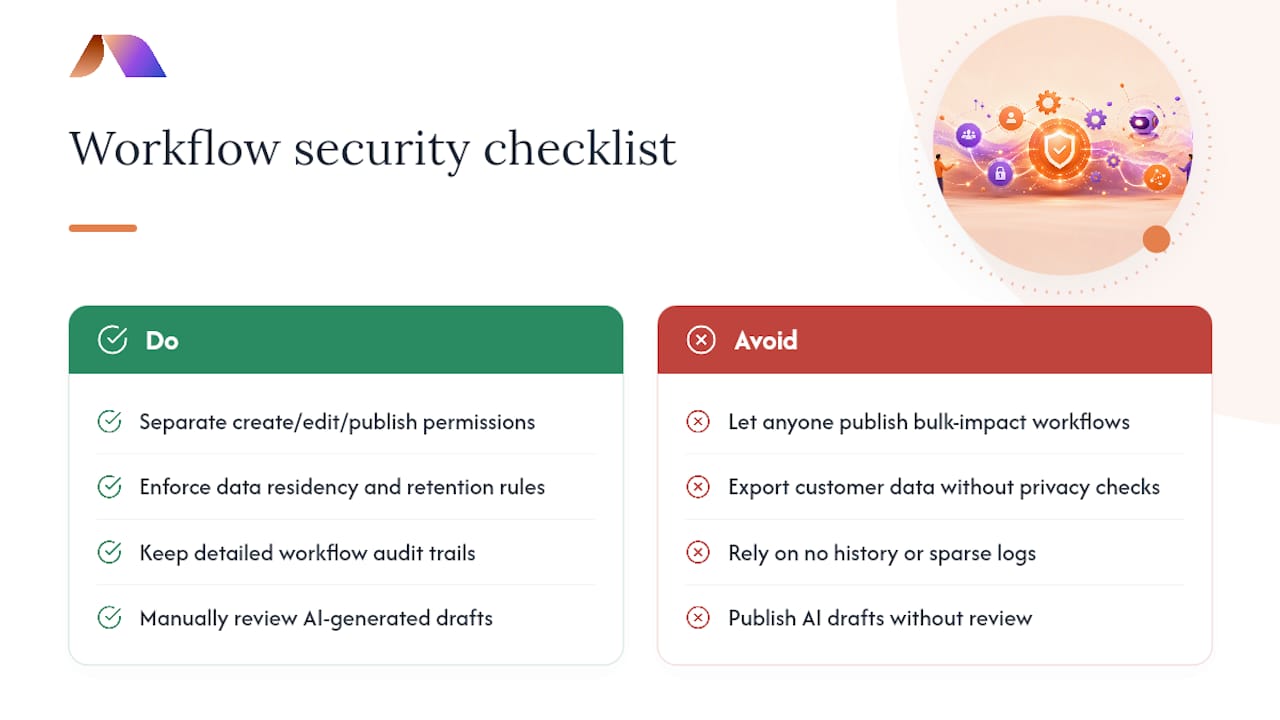
Every workflow that touches customer data is a compliance surface, whether you think of it that way or not. An automation that emails customers, updates records, or pushes data to a third-party system needs the same scrutiny as any other data process in the business.
Start with access control. Not everyone who can view a CRM record should be able to build or publish a workflow that acts on thousands of records at once. Most platforms let you separate workflow creation, editing, and publishing permissions, and that separation matters more as your team and workflow count grow.
Data residency and retention rules apply to automated actions the same way they apply to manual ones. If a workflow exports contact data to an external tool through a webhook, that transfer needs to meet whatever privacy obligations already govern your customer data, whether that is a state privacy law or an industry-specific rule in sectors like legal or healthcare-adjacent services.
Audit trails matter for two reasons: they help you debug a broken workflow, and they give you a record if a regulator or customer ever asks what happened to their data and when. A workflow history log that shows every enrollment, action, and outcome is not just an engineering convenience; it is documentation you may need later.
Finally, treat any AI-assisted workflow draft with extra caution before publishing. A generated action that pulls or shares data in a way you did not explicitly design deserves the same review as one a junior employee built from scratch.
What Are the Common Challenges and Limits of CRM Workflow Automation?
The most common failure is not technical. It is scope creep: a workflow built to solve one narrow problem slowly accumulates branches and exceptions until nobody fully understands what it does anymore. The fix is discipline, not more features. Split a bloated workflow into two or three focused ones rather than adding a sixth branch to an already tangled flow.
Data quality is the second major limit. A workflow can only act on the data it has, and a CRM full of missing fields, inconsistent formatting, or duplicate records will produce automations that misfire in ways that look like bugs but are actually garbage-in problems. Building a data hygiene workflow before building your sales automations often saves more time than skipping straight to the flashy stuff.
Native workflow tools also hit a ceiling on logic complexity. Most in-CRM editors handle linear branching well but struggle with true multi-variable decisioning, like weighing five different signals to decide urgency. That is usually the point where teams either accept the limitation or bring in outside engineering help.
Finally, workflows age. A trigger condition that made sense a year ago may no longer match how your team actually sells or supports customers. Without a review cadence, at least twice a year, workflows quietly drift out of alignment with the business and nobody notices until a customer complains.
What Do Advanced CRM Workflow Automation Scenarios Look Like?
Once the basics are solid, more complex scenarios start combining multiple workflows and data sources into a single coordinated process. A multi-touch deal-risk model is one example: instead of a simple stage-based reminder, a workflow ingests deal age, email response rates, and meeting frequency to calculate a risk score, then routes high-risk deals to a manager review queue while low-risk deals continue untouched.
Cross-system fulfillment is another. A closed-won deal in the CRM triggers a webhook to an ERP system to generate a purchase order, which then triggers a separate workflow back in the CRM to update the customer record once fulfillment confirms shipment. That loop, CRM to ERP and back, requires careful handling of timing and failure states, since a delay or dropped webhook on either end leaves records out of sync.

Service organizations sometimes combine ticket triage with automated response drafting: a workflow analyzes incoming ticket text, drafts a suggested reply, and routes both the ticket and the draft to an agent for approval rather than sending anything unsupervised. That pattern, similar in spirit to automated review response workflows, shows how AI augmentation extends a rule-based workflow into something closer to a decision-support tool. None of these scenarios replace human judgment entirely. They just make sure the right human sees the right information at the right moment, instead of digging for it manually.
Team BRDGIT Perspective: Practical Lessons From Deployments
Three patterns repeat across many client engagements. First, teams that skip a readiness assessment almost always rebuild their workflows within a year because they automated a process that needed fixing first, not automating. Second, permission sprawl, too many people able to publish workflows, causes more outages than bad logic does. Third, the fastest wins come from narrow, routine automations: lead routing and data hygiene, not ambitious AI projects. A proper assessment surfaces these risks before a single workflow goes live, with measurable time savings often visible within the first few months after cleanup.
How BRDGIT Helps Teams Build Automation That Goes Beyond the CRM
BRDGIT is the practical alternative to hiring a full AI team when your workflow needs outgrow what your CRM’s native editor can handle. Instead of a bloated platform overhaul, BRDGIT works in modular pieces: an AI Readiness Assessment to map which processes actually justify automation, a Workflow Crew engagement to build and test the flows themselves, and Fractional Engineer Services when you need ongoing technical support without a full-time hire.
A typical engagement starts with the assessment, moves into a roadmap that prioritizes the highest-impact automations first, and then shifts into implementation, custom agent builds, or dashboard creation depending on what the roadmap surfaces. Because the engagements are modular, you are not locked into a massive platform migration just to automate three processes. Teams that need deeper, ongoing engineering support can bring in fractional AI engineers instead of hiring full-time, scaling the support up or down as the workload changes. If your CRM workflows have hit their ceiling, start with a readiness assessment to find out exactly where the highest-value automation opportunities are sitting.
Sources
FAQ
What Is CRM Workflow Automation?
It is the use of rule-based triggers, conditions, and actions inside a CRM to automate repeatable tasks like lead routing, follow-up emails, and record updates without manual effort.
What Is the Difference Between a Trigger and Enrollment?
A trigger is the event that starts the process, such as a form submission or field change, while enrollment is the rule that decides which specific records qualify to enter the workflow when that trigger fires.
Can AI Build CRM Workflows Automatically?
Many platforms now offer AI-assisted workflow generation from a plain-language prompt, but every AI-generated action still needs manual review and testing before it goes live.
How Do I Know if I Need Custom AI Automation Instead of Built-In Workflows?
If your process requires combining signals from more than two or three systems, predictive scoring, or summarization rather than simple field matching, a native workflow builder is usually not enough, and that is where BRDGIT’s readiness assessment and Workflow Crew services come in.
What Does BRDGIT Charge for a CRM Automation Project?
Pricing for services like the AI Readiness Assessment, Workflow Crew, and Fractional Engineer Services is available directly on the BRDGIT site, since costs depend on project scope.
How Do You Prevent Duplicate Actions in a Workflow?
Use idempotency controls and tight re-enrollment rules so a record cannot trigger the same action twice, especially after a webhook retry or a temporary system failure.



