


Published on
Stop Rework: Construction Document Control for Project Teams With AI
Construction document control is the discipline of keeping every drawing, submittal, and approval traceable to a single current version, with a permanent record of who touched it and when. Done right, it prevents rework, speeds up field decisions, and gives you an evidence trail if a dispute lands in mediation. Three moves matter most: a standard naming convention, a strict revision protocol, and one true source for every file.
TL;DR:
Maintaining a strict file naming convention and revision protocol prevents outdated drawings and reduces rework in construction projects.
Automating transmittals with mandatory metadata and role-based access ensures an accurate and reliable document register.
Technology features like an unalterable audit trail, automatic version superseding, and offline mobile access are critical for effective control systems.
Starting implementation with a small pilot on high-activity trade packages and enforcing mandatory metadata improves adoption and minimizes drift.
AI can assist by automating metadata extraction, detecting duplicates, and improving RFI routing, but discipline in practice remains essential.
BRDGITTurn AI Ideas Into Field ExecutionBRDGIT helps construction teams identify practical AI opportunities, build clear roadmaps, automate workflows, and support implementation.Explore BRDGIT.ai
Table of Contents
What Does Construction Document Control Actually Cover?
Why Does Poor Document Control Cost So Much?
What Are the Core Best Practices for Document Control?
Which Technology Features Actually Matter?
How Do You Roll Out Document Control on a Live Project?
Can AI Improve Construction Document Control?
What’s the One Habit That Fixes Most Document-Control Failures?
Sources
What Does Construction Document Control Actually Cover?
Document control spans every file type on a job: drawings, specifications, submittals, RFIs, change orders, permits, inspection reports, and closeout packages. Each one moves through the same basic lifecycle: intake, review and approval, distribution, versioning, and eventually archive. Procore’s guidance on document control frames this as systematic management through creation, review, distribution, tracking, storage, and archival, so the whole team always references the current, approved information.
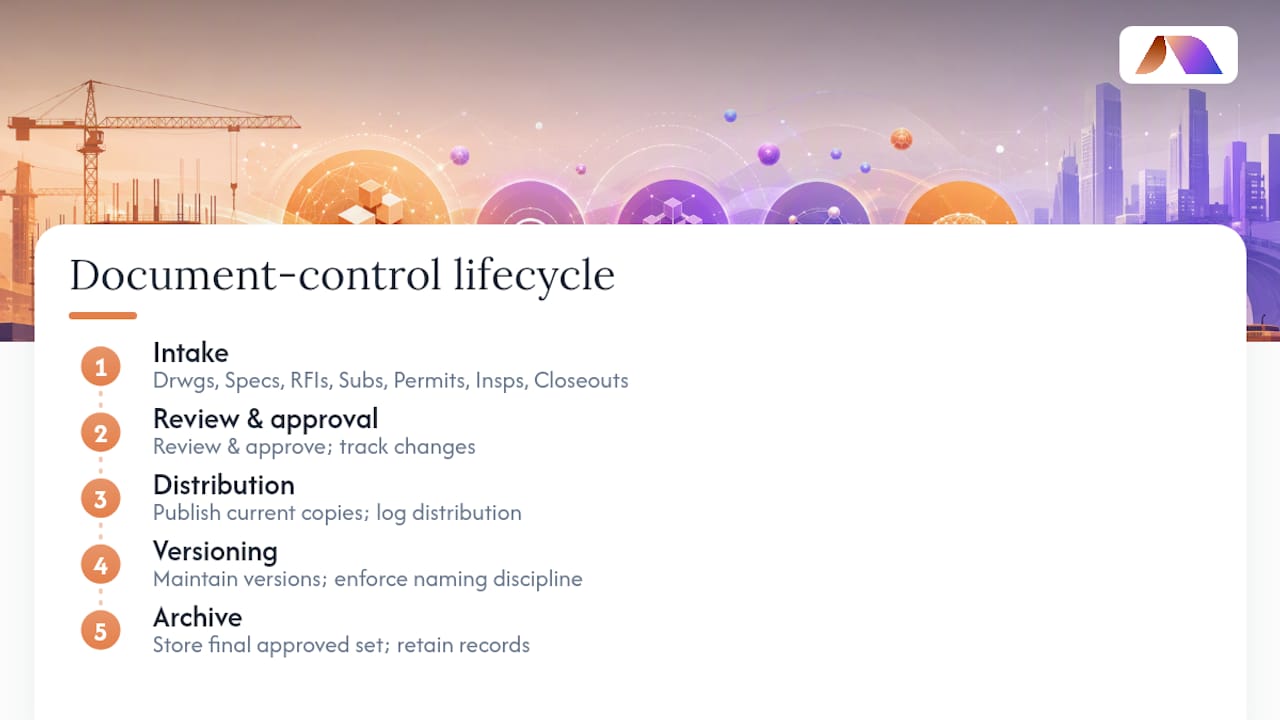
Ownership varies by document type but should never be ambiguous. The project manager typically owns change orders and contract-affecting decisions. The document controller owns the register, naming discipline, and distribution logs. The design team owns drawing revisions. Superintendents and subcontractors are consumers of the current set, but they’re also the first to flag a conflict between the drawing in hand and the one on the wall. When that ownership map is unclear, documents drift, and drift is where rework starts.
Why Does Poor Document Control Cost So Much?
A superintendent working from an outdated drawing doesn’t just make one mistake. He builds an entire wall section, a rack of conduit, or a foundation pour against information that’s already been superseded, and someone has to pay to tear it out. Schedule slips follow the same pattern: an RFI sits unanswered for two weeks because nobody knew who owned the response, and the float disappears from a critical path task.
The measurable signals of good control are straightforward to track: fewer field incidents tied to outdated drawings, faster RFI turnaround, and a closeout package that assembles in days instead of weeks.
Statistic: Document control problems tend to surface once a team is juggling more than 10 active projects, or once someone is spending over a third of the workweek just keeping files current. At that point, spreadsheets and email threads stop scaling, and a purpose-built system usually pays for itself within a project or two.
What Are the Core Best Practices for Document Control?
Most document control failures trace back to five gaps: no naming standard, loose version rules, open-ended access, missing transmittal records, and closeout treated as an afterthought. Fieldwire’s practical guide identifies these five practices as the foundation of reliable control, and they hold up whether you’re running a single retail buildout or a multi-tower campus.
Standardize file naming. Build a template with project ID, discipline code, document type, sequence number, and revision (something like
PRJ102 STRUC RFI 014 R2). ISO 19650 popularized this element-based approach, and it works because anyone, on any device, can identify a file without opening it.Lock down revision rules. Decide up front whether you’re using decimal notation (0.1, 0.2) for internal drafts and R-notation (R1, R2) for issued revisions, or one scheme throughout. New revisions get issued only when the change affects scope, dimension, or approval status, not for typo fixes.
Set role-based access and a distribution matrix. Not everyone needs edit rights, and not everyone needs every drawing. Map who receives what, automatically, the moment a document is approved.
Automate transmittals with required metadata. Every upload should force fields for discipline, revision, and approval status before the system accepts the file. Skipping this step is how registers rot within a few months.
Design closeout from day one. Progressive collection of as-builts, warranties, and inspection sign-offs beats a frantic scramble in the final month. Link every as-built revision back to its RFI or change order so the closeout package tells a coherent story.
Pro Tip: Require metadata fields and an automatic transmittal on every single upload, no exceptions. This one habit does more to keep a register clean than any software feature you’ll pay for.
Which Technology Features Actually Matter?
Vendor marketing tends to bury the features that matter under ones that don’t. When you’re evaluating a platform, judge it against these criteria instead of a feature list on a sales deck.
An unalterable audit trail. Oracle’s Aconex platform documentation makes the case that no user action should be able to delete or alter project history, because that permanent record is what protects you in a claim.
Automatic version superseding. When a new revision is approved, every linked reference, RFI, and submittal should point to it automatically, with the old sheet marked obsolete rather than silently sitting in a folder.
RFI and submittal workflows tied to drawing locations. An RFI that references a specific sheet and grid line resolves faster than one that says “see attached.”
Mobile and offline capability. Field crews need to pull current drawings and log photos without signal, then sync automatically once they’re back in range.
BIM and 5D integration for change orders. Linking model data to schedule and cost tools lets you visualize and quantify change-order impacts before the change gets approved, not after the dispute starts.
Search and metadata quality tie all of this together. A register with clean, consistent metadata is searchable in seconds; one without it becomes a filing cabinet nobody trusts.
How Do You Roll Out Document Control on a Live Project?
Start small. Define the minimum governance documents first: your naming template, your revision policy, and your distribution matrix. Without those three, no software will save you.
Assign roles clearly. Name a document controller, confirm who approves each document type, and put it in writing before the first drawing set goes out.
Pilot on one trade or package. Running a four to eight week pilot on a single subcontractor package lets you catch naming and workflow problems before they spread project-wide.
Train both office and field. Office staff need the upload and approval workflow; field crews need the mobile app and the discipline to stop working off a printed sheet that might already be superseded.
Enforce at checkpoints. Weekly spot checks on whether field crews are working from current drawings catch drift before it becomes a rework bill.
Track KPIs. Monitor RFI response time, the percentage of field staff confirmed on current drawings, and how long closeout assembly takes compared to your last project.
Pro Tip: Run your pilot on the trade package with the most change activity, not the simplest one. That’s where document control either proves its value fast or shows you exactly where your process breaks.
Can AI Improve Construction Document Control?
AI’s most useful role in document control right now isn’t flashy. It’s automated metadata extraction on upload, document similarity detection that flags a duplicate or near-duplicate submittal before it clutters the register, and intelligent RFI routing that gets a question to the right reviewer without a human triaging every ticket.
Change-order impact profiling is where it gets genuinely interesting. Explainable predictive models are emerging that surface the specific factors driving a change order’s cost or schedule risk, rather than just spitting out a risk score you have to trust blindly. That interpretability matters in construction, where a superintendent needs to understand why a model flagged a change order before acting on it.
Start with a readiness assessment to see which document types and workflows are AI-ready.
Pilot on a single project before scaling across a portfolio.
Track KPIs like RFI routing accuracy and change-order flag precision to justify expansion.
Address data governance and access control before feeding sensitive contract data into any model.
Teams without in-house AI engineering can bring in fractional AI support to bridge that gap without a full-time hire.
What’s the One Habit That Fixes Most Document-Control Failures?
Most of the document-control failures we see trace back to one root cause: someone treated metadata and transmittals as optional. A file gets uploaded without a revision tag, or distributed without a formal transmittal, and three weeks later two crews are working from two different versions of the same wall section. It’s rarely a software failure. It’s a discipline failure that software can’t fully compensate for.
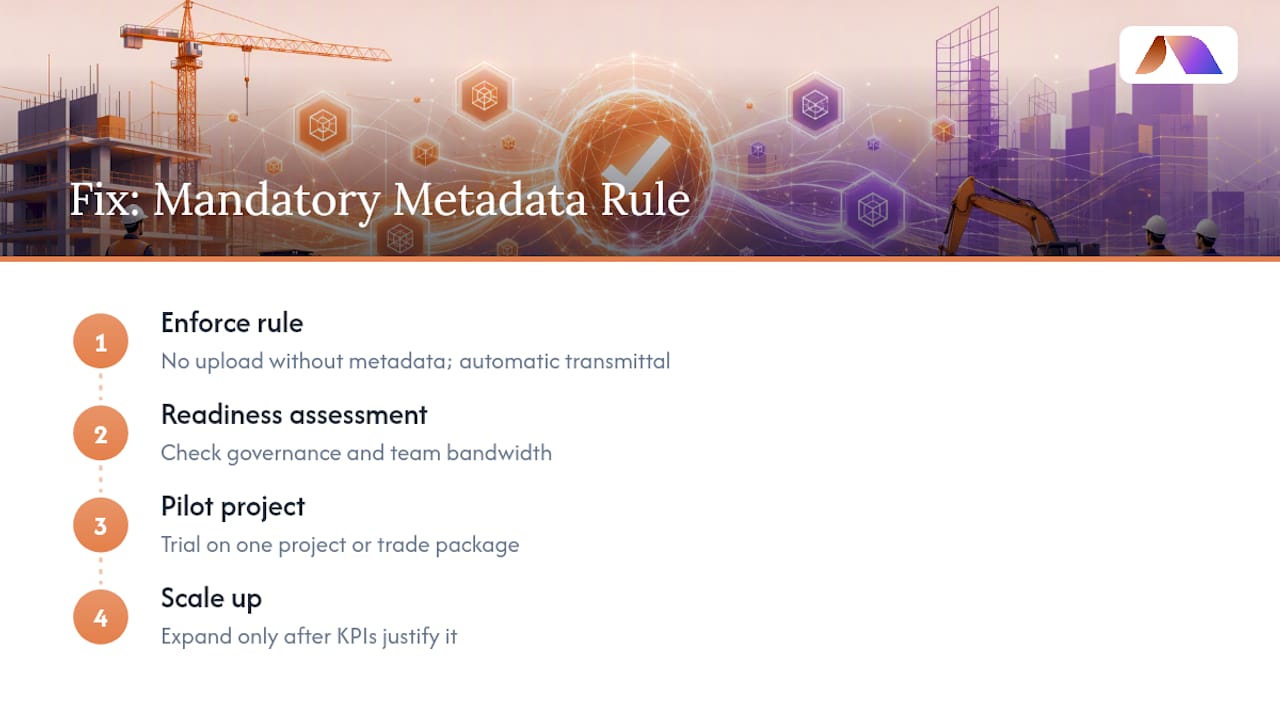
The fix is not complicated, but it has to be mandatory, not aspirational: no upload without required metadata, no distribution without an automatic transmittal. That single rule, enforced without exception, resolves more version conflicts than any feature upgrade.
We approach this the way we approach most operational AI work: start with a readiness assessment, pilot on one project or trade package, and scale only once the KPIs justify it. If your team doesn’t have the bandwidth to build that governance layer alone, a readiness assessment is a reasonable place to start.
— Team BRDGIT
Sources
Construction Document Control: Best Practices for Managing Project Files — Procore
Construction document control: A practical guide | Fieldwire by Hilti



