


Published on
Pilot Intelligent Document Processing Right: 5 KPIs Leaders Must Track
Intelligent document processing (IDP) automatically converts unstructured and semi-structured documents into validated, structured data your systems can act on. It combines optical character recognition, natural language processing, and machine learning to capture, classify, extract, and route information without a person retyping any of it. Teams drowning in invoices, claims, contracts, or intake forms see the fastest payoff.
TL;DR:
Using IDP is most effective when documents are digital, with high-quality scans and consistent layouts, to ensure reliable OCR and classification.
Error rates heavily depend on confidence scores, making human review essential for low-confidence fields to maintain accuracy and continuous learning.
ROI accelerates in industries with high-volume, structured documents, such as accounts payable, HR, insurance, legal, and logistics, where automation can significantly reduce manual effort.
Successful pilot projects require thorough data readiness audits, clear success metrics, narrow scope, and defined thresholds for scale or stop decisions.
Combining a prebuilt platform with targeted external expertise often yields better results than relying solely on off-the-shelf solutions or full consulting, especially with complex document workflows.
Table of Contents
How Does Intelligent Document Processing Work?
What Business Benefits and KPIs Come From IDP?
Where Does IDP Deliver the Most Value?
How Do You Choose and Implement an IDP Solution?
What Do Teams Get Wrong When Piloting Document AI?
Should You Hire a Consultant or Buy an IDP Tool?
Ready to Pilot IDP the Right Way?
Sources
How Does Intelligent Document Processing Work?
IDP is not one piece of software. It is a pipeline of technologies stitched together. Understanding each stage matters if you’re going to evaluate whether a vendor’s claims hold up on your actual documents rather than their demo set.
The pipeline starts with ingestion. Documents arrive by email, scanner, upload portal, or API feed, and the quality of that input controls everything downstream. Clear digital PDFs and high-resolution scans with minimal skew produce far better results than crumpled faxes or phone-camera photos, and Microsoft’s guidance on prebuilt invoice models is blunt about this: readable fonts and standard layouts are a prerequisite, not a nice-to-have.
Next comes classification, sorting an incoming batch into document types before any extraction happens. Simple rules work fine when your document set is narrow and consistent, like a single invoice template from one supplier. Once you’re dealing with dozens of vendors, form variants, or handwritten intake sheets, a trained machine learning classifier usually outperforms hardcoded rules because it generalizes to layouts it hasn’t seen before.
Extraction is where the real technical variety shows up:
OCR converts pixels into readable text, still the foundation layer for anything scanned or photographed.
Computer vision locates fields, tables, and signature blocks spatially, even when layout shifts between documents.
NLP and named-entity recognition (NER) pull out dates, amounts, names, and clauses from surrounding text.
Table and line-item extraction handles the notoriously hard problem of multi-row invoice details or shipping manifests.
LLM-assisted extraction increasingly handles ambiguous or free-text fields that rigid templates miss.
Every extracted field carries a confidence score, and this is the operational hinge of the whole system. High-confidence fields flow straight through; low-confidence ones get flagged for a human reviewer. That human-in-the-loop step feeds corrections back into the model, a continuous learning loop that Microsoft’s Power Platform documentation identifies as a core driver of improving accuracy over time.
Pro Tip: Ask any vendor exactly what happens when confidence drops below threshold on a field, not just what happens when it’s high. That failure path is where most pilots actually break.
Finally, validated data integrates with ERPs, RPA bots, document stores, and downstream APIs. AWS describes this full loop as capture, extract, validate, and integrate, and the integration step is often the one teams underestimate when scoping a project.
What Business Benefits and KPIs Come From IDP?
The business case for IDP rests on five measurable levers: speed, accuracy, cost per document, auditability, and customer experience. Enterprise vendors like SAP point to reduced processing time and fewer manual steps once table extraction and learning loops mature, and that pattern holds across most document-heavy back offices.
Before you greenlight a pilot, agree on the metrics you’ll actually track:
Throughput — documents processed per hour or day, unattended.
Error rate — how often extracted fields require correction after the fact.
Straight-through processing (STP) rate — the percentage handled with zero human touch.
Cost per document — fully loaded, including review labor and software fees.
Time to decision — how long from document arrival to a completed action (payment, approval, claim disposition).
In practice: vendor guidance recommends setting acceptance thresholds before launch, meaning a target confidence score per field and a maximum acceptable human-review rate, so you’re measuring against a real bar rather than a vague sense of “better.”
ROI arrives quickly when document volume is high, formats are relatively standardized, and you have clean historical samples to test against. It slows down when documents are highly variable, handwritten, or multilingual, since the classifier and extraction models need more training examples to reach useful accuracy. Buyer-side testing on your own document samples, not a vendor’s curated demo set, is the single best predictor of whether the accuracy numbers a vendor advertises will hold once you go live.
Where Does IDP Deliver the Most Value?
IDP earns its budget fastest in processes where document volume is high and the fields being extracted are predictable enough to train against, even if the layouts vary. Five industries consistently see the clearest returns.
Accounts payable. Line-item extraction paired with three-way matching against purchase orders and goods-receipt notes turns invoice processing from a manual keying task into an exception-only workflow. Nanonets’ AP automation examples show that automation stalls at header-level fields (vendor name, invoice number, total) unless the pipeline explicitly handles line-item tables and PO lookups, so ap workflow automation projects need to scope that from day one.
HR. Resume parsing extracts skills, work history, and education into structured candidate profiles, while onboarding form automation captures tax and benefits data without a recruiter retyping it into three separate systems.
Insurance. Claims intake and triage use document classification to sort incoming claims by type and urgency, routing complex cases to adjusters while straightforward ones move through faster.
Legal. Contract clause extraction identifies obligations, renewal dates, and liability terms across large agreement portfolios, a task that’s brutal to do manually at scale but well suited to NLP-driven review.
Logistics. Bills of lading and shipping documentation, often inconsistent across carriers, get standardized into structured shipment records that feed tracking and billing systems.
Each of these cases shares a common thread: the document types are numerous enough that manual review doesn’t scale, but structured enough that a trained model can learn the patterns.
How Do You Choose and Implement an IDP Solution?
Picking an IDP platform without testing it against your own paperwork is the most common way projects underdeliver. Run these checks before you sign anything.
Start with a data readiness audit. Pull a representative sample of your actual documents, not your cleanest ones, and check the mix of scanned versus digital files, layout consistency, and how much handwriting or free text appears. This sample becomes your benchmark for every vendor conversation that follows.
Evaluate against fixed criteria, not marketing copy:
Accuracy measured on your sample documents, not the vendor’s demo set
Table and line-item extraction support, if your documents include them
Confidence scoring granularity and how retraining actually works
Integration effort required to connect with your ERP or document store
Security posture and compliance certifications relevant to your industry
Design the pilot narrowly. AWS recommends picking one high-volume, high-value document type, building a minimum viable pilot around it, and measuring before expanding. Define your success metrics and acceptance thresholds, confidence score minimums per field, target STP rate, maximum review rate, up front, along with a realistic timeline. A few weeks to a couple of months is typical for a first pilot on a single document type.
Build governance in from the start, covering PII handling rules, a documented retraining policy, audit trails for every extracted field, and a clear owner for ongoing model performance. This isn’t paperwork for its own sake. It’s what keeps a working pilot from quietly degrading six months later.
Assign roles clearly. Internal teams own data access, process context, and change management with the staff who’ll use the system daily. A vendor or consultant typically owns model tuning, integration engineering, and technical troubleshooting. Skipping the change management piece, assuming people will just adapt, is a quieter failure mode than any technical gap.
Pro Tip: Test the vendor’s fallback path, not just its happy path. Ask what happens when a document type shows up that the model has never seen. If the answer is “it fails silently,” that’s your answer on whether to proceed.
For AP specifically, confirm your evaluation covers PO/GRN lookups and GL-coding rules, since a pipeline that stops at header-level fields will still leave your team hand-coding every line item.
What Do Teams Get Wrong When Piloting Document AI?
Most failed IDP pilots don’t fail on the technology. They fail on setup. We see the same three mistakes repeatedly: testing on cherry-picked sample documents instead of the messy real ones, launching without agreed success metrics, and discovering integration blockers only after the pilot is technically working.
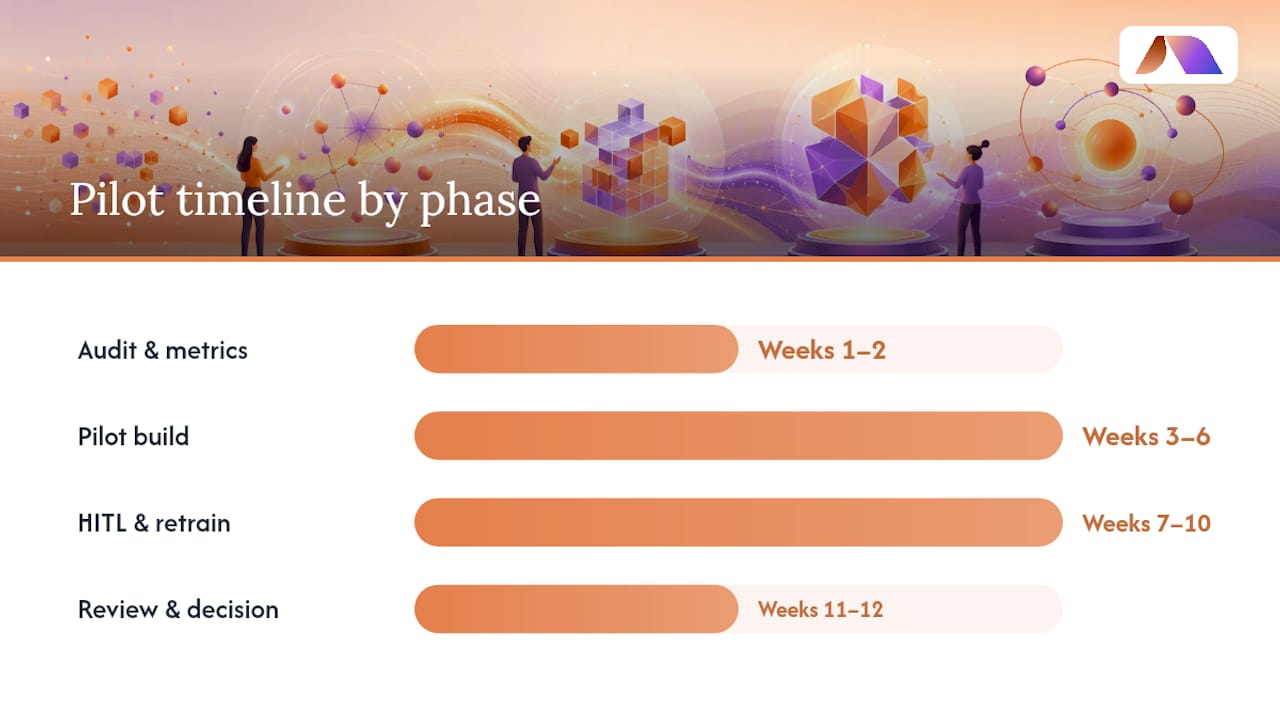
BRDGIT’s approach starts with a readiness assessment: auditing your actual document mix, current workflow, and integration points before recommending any platform or build. From there, we scope a minimum viable pilot on one document type, sized for measurable results in four to twelve weeks.
A typical engagement includes:
Week 1 to 2: document audit, sample collection, success metrics defined
Week 3 to 6: pilot build, classifier and extraction tuning, initial confidence thresholds set
Week 7 to 10: human-in-the-loop testing, retraining cycle, integration with target systems
Week 11 to 12: performance review against acceptance thresholds, scale/no-scale decision
Pro Tip: If a proposed pilot timeline has no defined “scale or stop” decision point, push back before you start. Open-ended pilots rarely end.
Our fractional engineers stay engaged past go-live, since retraining and governance need ongoing attention, not a one-time handoff.
Should You Hire a Consultant or Buy an IDP Tool?
Heterogeneous document types, multiple system integrations, or real governance requirements are signals you need a consultant guiding the build, not just software. A prebuilt tool alone often suffices for narrow, high-volume, standardized forms, like a single invoice template from a handful of vendors.
Most organizations land somewhere in between. A common pattern: license a platform for its extraction engine, then bring in fractional AI expertise to customize the pipeline, wire up integrations, and set governance rules the vendor’s default configuration doesn’t cover. That hybrid model, tool plus targeted expertise, tends to outperform either extreme.
— Team BRDGIT
Ready to Pilot IDP the Right Way?
BRDGIT is the option for teams that don’t want to gamble a quarter on a self-service platform trial with no one accountable for the outcome. Where an off-the-shelf tool leaves you to figure out data readiness, integration, and governance alone, BRDGIT builds the pilot around your actual documents from day one and stays accountable through go-live.
Our path starts with a readiness assessment of your document workflows, moves into a scoped pilot on your highest-value document type, and measures results against the acceptance thresholds we set together before scaling anything further. If you already have engineering capacity but need specialized document-AI expertise without a full-time hire, our fractional engineers can slot directly into your team for the duration of the project. For a look at how we scope automation priorities before any build begins, our guide on picking your first back-office workflow to automate walks through the same prioritization logic we use with clients. Reach out for a readiness assessment and we’ll tell you honestly whether a pilot makes sense yet.
Sources
Technical specifications and pipeline details draw from AWS’s IDP overview, Microsoft’s Power Platform documentation, and Gartner’s IDP solutions reviews. For invoice automation setup steps, see this practical implementation guide.
What is Intelligent Document Processing? - IDP Explained - AWS
Training: Extract invoice data with AI Builder’s prebuilt model (module) - Microsoft Learn
Best Intelligent Document Processing Solutions Reviews 2025 - Gartner



