


Published on
Workflow Automation Ideas by Team: AI Agents and Five Steps to a Pilot
Workflow automation means using software to handle repeatable steps in a business process so people spend less time on manual handoffs and more time on judgment calls. The ideas below span HR, marketing, sales, finance, IT, support, and operations, with a special focus on where AI agents now change what’s possible. Start by mapping one process end to end, then pick a single step worth automating first.
TL;DR:
Prioritize handoffs where information already sits in a system but someone must move, check, or approve it; examples include invoice matching and employee access changes.
Workflow redesign around AI agents was nearly three times more likely to deliver meaningful EBIT impact than automating isolated tasks, according to McKinsey.
Keep the first pilot narrow, assign one owner, define triggers and acceptance criteria, and use a propose, approve, and execute checkpoint before automation acts.
Quick routing or notification automations can launch in weeks; integrated pilots usually take four to twelve weeks, while agentic redesigns take three to nine months.
Track cycle time, errors, handoff delays, staff hours, and transaction costs before and after launch, then review workflows affecting customers quarterly for drift.
BRDGITTurn Automation Ideas Into ActionBRDGIT helps businesses identify AI opportunities, automate workflows, and build custom AI systems around their needs.Explore BRDGIT’s AI services
Table of Contents
1. Department-by-department automation ideas worth stealing
2. AI and agentic automation: when to redesign instead of automate
3. A five-step playbook for launching your first automation pilot
4. What to measure and when to expect results
5. Keeping automated workflows current as the business changes
6. How we decide which automation ideas are worth building first
Getting from automation ideas to a working pilot
FAQ
Sources
1. Department-by-department automation ideas worth stealing
Every department has at least a handful of steps that eat hours without needing a human brain. We’ve grouped the sharpest ones by function, with the trigger that kicks them off, the category of tool that handles them, and the payoff you get once they’re running.
HR and people operations
Onboarding document routing, triggered the moment a new hire signs their offer, using low-code automation to push forms to payroll, IT, and benefits simultaneously. It cuts onboarding from a week of chasing signatures to a single day.
PTO request approvals, triggered by a calendar entry, routed through conditional logic that auto-approves standard requests and flags exceptions for a manager.
Interview scheduling, triggered by a recruiter’s shortlist, handled by scheduling automation that reads calendar availability across time zones.
Exit interview and offboarding checklists, triggered by a resignation date, using workflow software to revoke system access and trigger final-pay calculations on schedule.
Benefits enrollment reminders, triggered by open enrollment windows, sent through automated email sequences tied to HR system records.
Marketing
Lead scoring and segmentation, triggered by form fills or site behavior, using marketing automation platforms to route hot leads to sales within minutes instead of days.
AI-assisted content drafts, triggered by a content calendar entry, where a generative AI tool produces a first draft for a human editor to shape, cutting first-draft time significantly.
Social post scheduling and approval, triggered by campaign launch dates, using approval workflows that notify stakeholders automatically before publishing.
Campaign performance reporting, triggered by a weekly schedule, pulling data into dashboards instead of manual spreadsheet exports.
Sales
Quote and proposal generation, triggered by a closed-won stage change, using document automation that pulls pricing and terms from a CRM.
Contract routing for e-signature, triggered by deal approval, using API orchestration between the CRM and a signature platform.
Follow-up sequencing for stalled deals, triggered by inactivity after a set number of days, using AI outreach drafts a rep reviews before sending.
Renewal and upsell alerts, triggered by contract end dates, flagging account managers automatically ahead of expiration.
Finance
Invoice processing, triggered by an incoming PDF or email, using document OCR plus RPA to extract line items and route for approval.
Expense report approvals, triggered by submission, using rule-based workflows that auto-approve under a set threshold and escalate above it.
Accounts payable three-way matching, triggered by a received shipment, cross-checking purchase orders, invoices, and receipts without manual review.
Monthly close checklists, triggered by calendar date, assigning tasks automatically to the right finance team member.
IT
User provisioning and deprovisioning, triggered by HR system status changes, syncing access across tools the moment someone joins or leaves.
Patch and update deployment, triggered by vendor release schedules, using automation to push updates during low-traffic windows.
Password reset self-service, triggered by a help desk ticket, resolved without a technician touching it.
Customer support
Intelligent ticket routing, triggered by ticket content and sentiment, using AI classification to send issues to the right queue instantly instead of sitting in a general inbox.
Automated status updates, triggered by ticket stage changes, keeping customers informed without an agent typing the same update twice.
Knowledge base suggestions, triggered by a new ticket, surfacing relevant help articles to agents before they even start typing a reply.
Operations
Cross-system handoffs between sales and fulfillment, triggered by order confirmation, using workflow orchestration so no order sits waiting for someone to notice it.
Inventory reorder triggers, triggered by stock thresholds, generating purchase orders automatically.
Vendor compliance checks, triggered by contract renewal dates, flagging missing certifications before they become a problem.
The pattern across all six departments is the same: find the step where information already exists in a system but a person has to manually move it, check it, or approve it. That’s where automation pays off fastest.
2. AI and agentic automation: when to redesign instead of automate
Automating a single task rarely delivers the biggest win. Organizations that redesigned entire workflows around AI, rather than bolting automation onto an existing process, were nearly three times as likely to report meaningful EBIT impact from McKinsey’s state of AI research. The lesson: before automating a task, ask whether the whole workflow should be rebuilt around what AI agents can now do in parallel.
Five key agentic patterns are worth designing around:
Prioritization agents that score and rank incoming work, like sorting support tickets by urgency and customer value before a human ever opens them.
Outreach agents that draft and sequence follow-up communication, freeing reps to focus on conversations that need a human voice.
Scheduling agents that negotiate meeting times across calendars and time zones without back-and-forth email.
Validation agents that check outputs against business rules, catching errors before they reach a customer or a ledger.
Monitoring agents that watch for anomalies in transactions or system behavior and flag them before they escalate.
Agentic AI introduces new governance needs. The NIST generative AI risk profile recommends assigning explicit oversight roles, testing systems against performance thresholds, maintaining transparency about training data, and building a clear deactivation protocol before any agent goes live.
Pro Tip: Before automating a task, ask whether the whole workflow around it should be redesigned, since task-level fixes rarely deliver the same payoff as a rebuilt process.
McKinsey found that companies redesigning workflows were roughly three times more likely to see meaningful bottom-line impact from AI than those automating in isolated pieces, a gap large enough to change how any team should prioritize its AI roadmap.
3. A five-step playbook for launching your first automation pilot
Big automation programs fail when they start too big. A tighter, five-step approach keeps risk low while still proving real value.
Map the current process exactly as it happens today, including every handoff, delay, and exception, not the version written in the employee handbook.
Choose one pilot that’s narrow enough to finish in weeks, has a single clear owner, and touches minimal sensitive data.
Define triggers, rules, and acceptance criteria before writing a single line of automation logic, so everyone agrees on what “working” looks like.
Add human checkpoints using a propose-approve-execute structure, where the system suggests an action, a person approves it, and only then does it execute.
Measure results, then scale by automating the next handoff in the chain rather than jumping to a different process entirely.
Atlassian’s framework for workflow automation describes this same layered approach: trigger, route, action, checkpoint, and observability, built one piece at a time rather than all at once.
Before launch, run through a short checklist: Where does the data for this workflow actually live? What happens when the automation hits an exception it can’t handle? Is there a rollback plan if the pilot causes more friction than it removes?
Pro Tip: Pick a pilot you can fully explain to a new hire in two minutes. If the process takes longer than that to describe, it’s not a pilot yet.
4. What to measure and when to expect results
A pilot without KPIs is just a guess dressed up in software. Track a short list of numbers before and after launch:
Cycle time, how long the process takes from start to finish.
Error rate, how often output needs correction or rework.
Handoff time, how long work sits waiting between steps.
Employee hours saved, measured against the manual baseline.
Cost per transaction, especially for high-volume processes like invoicing.
Customer response time, for anything touching support or sales.
Timeline bands matter too. Quick wins, like routing or notification automations, can go live in weeks. Pilots involving new tool integrations typically run four to twelve weeks. Full workflow redesigns, especially ones involving agentic AI, often take three to nine months. Cost scales with the number of systems an automation needs to touch and how much human review it still requires.
McKinsey’s research on gen AI adoption notes that companies tracking clear KPIs and road maps are more likely to capture bottom-line value from their automation and AI investments, which makes an honest baseline worth the extra week it takes to build.
5. Keeping automated workflows current as the business changes
An automation built for last year’s process quietly breaks when the business shifts around it. A new system gets added, a policy changes, a team restructures, and the rules written into an automation stop matching reality.
Assign an owner to every live automation, not just at launch but for its entire life. That person should review the workflow on a set schedule, quarterly for anything touching customer-facing processes, and check whether the triggers, rules, and exception paths still reflect how the business actually runs.
Watch for signs a workflow needs an update: a rising rate of manual overrides, exceptions piling up in a queue nobody’s resolving, or a new system coming online that the automation doesn’t talk to yet. Each of those is a signal that the automation has drifted from the process it was built to serve.
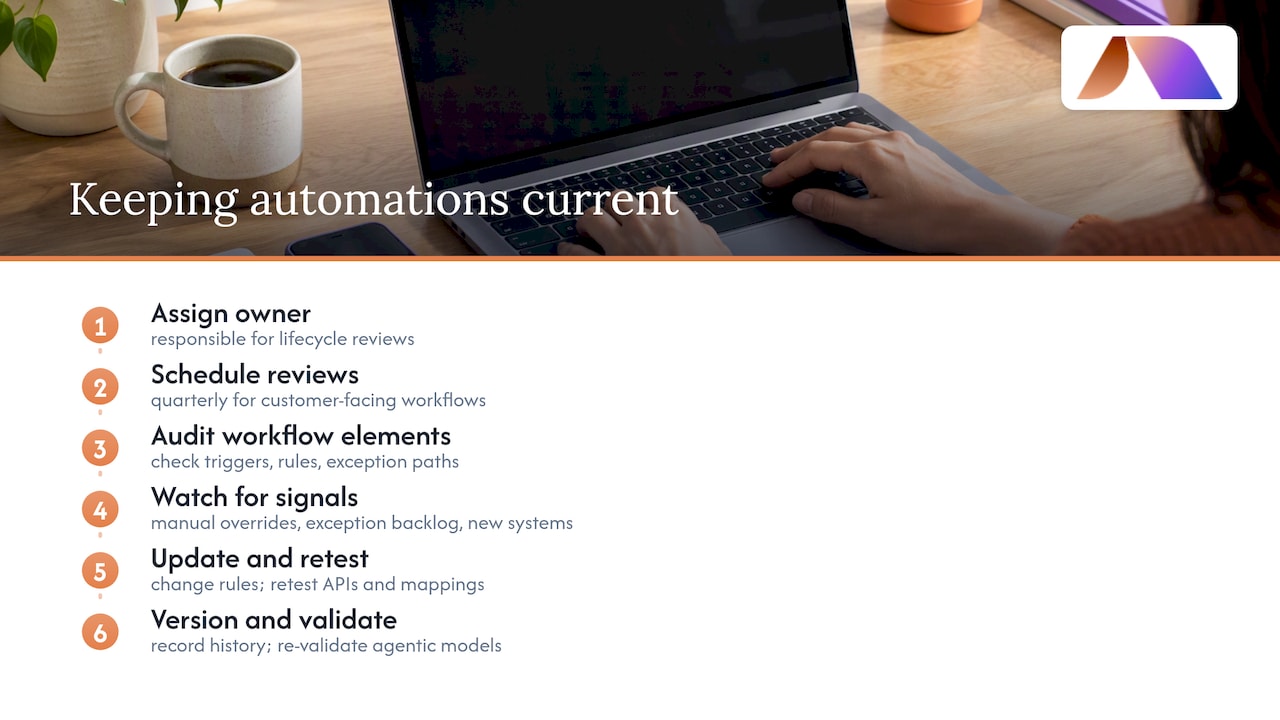
Build in version history so changes to rules and triggers are documented, which matters most when an automation touches financial or compliance-sensitive steps. When integrating with CRM, ERP, or communication platforms, confirm that API connections and field mappings get retested after any vendor update, since a silent schema change upstream can break a workflow without any visible error.
Treat agentic automations with extra care. The oversight roles and testing thresholds recommended by NIST’s generative AI guidance aren’t a one-time setup step. They need periodic re-validation as the underlying models, data, and business rules evolve.
6. How we decide which automation ideas are worth building first
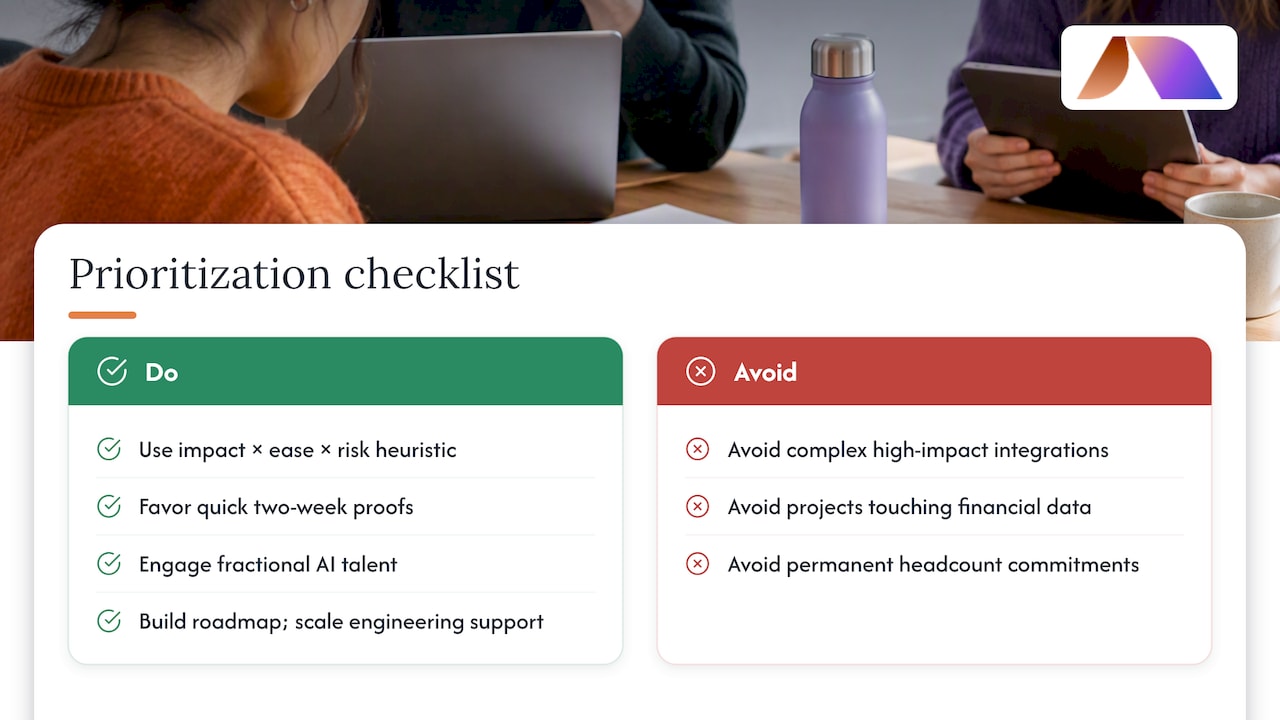
We prioritize automation opportunities with a simple heuristic: impact times ease times risk exposure. A high-impact idea that touches sensitive financial data and needs six system integrations usually loses out to a smaller win that’s live in two weeks and proves the model works.
We tend to bring in fractional AI talent for situations like workflow redesigns that span multiple departments, agentic AI projects needing governance and testing, or teams without in-house AI engineering depth. The outcomes we aim for include faster pilots, a roadmap the team understands, and engineering support scaled to the problem instead of a permanent headcount commitment.
— Team BRDGIT
Getting from automation ideas to a working pilot
Reading a list of automation ideas is the easy part. Turning one into a working pilot, with the right triggers, the right human checkpoints, and a rollback plan, is where most internal efforts stall. That’s the gap our services at BRDGIT are built to close, with support sized to how much a team already knows about AI rather than a one-size-fits-all package.
A short AI Readiness Assessment tells you where your highest-value automation opportunities actually sit before you spend a dollar building anything. An AI Blueprint turns that assessment into a prioritized roadmap. A Workflow Crew engagement takes a specific process from idea to live pilot, and Fractional Engineer Services give you ongoing AI engineering support without a full-time hire.
Service | Best for |
|---|---|
Finding your highest-impact automation opportunities | |
AI Blueprint | Turning priorities into a clear implementation roadmap |
Workflow Crew | Building and launching a specific automation pilot |
Ongoing AI engineering support without a full-time hire |
A DIY pilot works fine for a single, low-risk process. Once a project spans multiple systems or needs agentic governance built in from the start, bringing in fractional engineering support tends to shorten the path from idea to a pilot that actually holds up. Visit the BRDGIT landing page to see which engagement fits where your team is right now.
FAQ
What is workflow automation in simple terms?
Workflow automation uses software to handle repeatable steps in a business process, like routing approvals or moving data between systems, without a person manually touching each step. It frees people to focus on decisions that actually need judgment rather than repetitive handoffs.
What’s the difference between automating a task and redesigning a workflow?
Automating a task means speeding up one isolated step, like auto-filling a form. Redesigning a workflow means rebuilding the whole process around what automation and AI agents can do together, which McKinsey’s research links to a much higher chance of meaningful bottom-line impact.
How long does a typical automation pilot take?
Quick-win automations, like notification routing, can launch in a matter of weeks. Pilots involving new system integrations more commonly run four to twelve weeks, while full workflow redesigns involving agentic AI often take three to nine months.
What should I measure to know if an automation pilot worked?
Track cycle time, error rate, handoff time, employee hours saved, and cost per transaction before and after launch. Companies that track clear KPIs and roadmaps are more likely to see real value from their automation investments, according to McKinsey’s adoption research.
Does BRDGIT offer help beyond building the automation itself?
Yes. Alongside automation builds through Workflow Crew, BRDGIT offers an AI Readiness Assessment and AI Blueprint to identify and prioritize opportunities, plus Fractional Engineer Services for ongoing support once a workflow is live.



