


Published on
Staffing Onboarding Automation: Fix the Gaps Between Systems
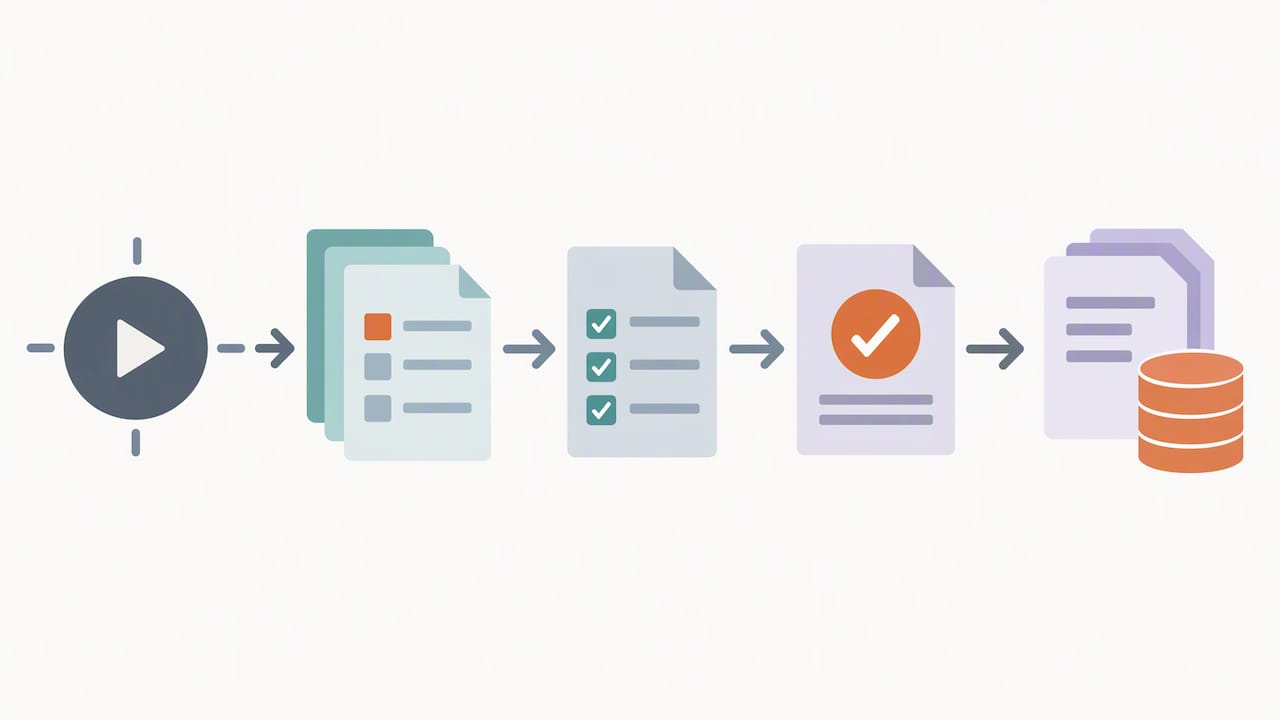
The single highest-leverage move in onboarding automation staffing operations can make is this: trigger a rules-based workflow the moment a placement closes in the applicant tracking system, and route the new hire straight into a mobile self-service packet that enforces client, state, and role rules while automating verification. Set that trigger first. Then build per-client and per-role templates. USCIS rules and BRDGIT’s own implementation work both point to the same sequence.
TL;DR:
Encode employment classification before building templates, because employee placements require tax and eligibility forms, while independent contractor placements use different documents, checks, and payroll routes.
E-Verify employers in good standing may use live video for remote eligibility checks, but must retain clear document copies and apply the procedure consistently.
Track time to start, completion before the first day, delayed start dates, and recruiter interventions; review results weekly during the first month, then monthly.
Pilot one client and one role before expanding: a narrow test checks real placement rules without forcing a platform overhaul or a full scale rollout.
BRDGITbrdgit.aiMake Onboarding Workflows More ReliableBRDGIT helps staffing teams identify automation opportunities, map workflows, and build custom AI systems around their operational needs.Explore BRDGIT’s AI support
Table of Contents
What Onboarding Automation Covers for Staffing Teams
Decide Employment Model and Classification Before Building Workflows
Step-by-Step Playbook to Automate Staffing Onboarding
Staffing-Specific Compliance: I-9, E-Verify, and Record Retention
How to Measure Whether Your Onboarding Automation Is Working
Tools, Integrations, and Orchestration Patterns
BRDGIT Perspective: Moving From Pilot to Production With Minimal Risk
How BRDGIT Can Help: Services and Next Steps
FAQ
Sources
What Onboarding Automation Covers for Staffing Teams
Onboarding automation is not one tool. It is a chain of smaller decisions, each one encoded as a rule so a human does not have to remember it for every single placement. For a staffing firm running dozens or hundreds of placements a month, that chain has to hold up under volume, which is a different problem than onboarding one employee at a time.
The core components look like this:
Triggers: events in the ATS, like “offer accepted” or “placement confirmed,” that kick off the workflow automatically.
Document collection: a packet of forms, IDs, and certifications assembled based on the role and client.
Verification: identity checks, background screens, and credential confirmations run against the right standard for the job.
Conditional checklists: different requirements for a warehouse role in one state versus a licensed technician role in another.
Reminders and escalations: nudges to the candidate, and alerts to a recruiter only when something stalls.
Handoffs: a clean data pass to payroll, timesheets, and client billing systems once onboarding closes out.
Per-client and per-role templates matter because staffing agencies rarely place one type of worker for one type of client. A single recruiter might juggle a hospital’s credentialing rules, a warehouse’s state-specific safety training, and a construction client’s I-9 timing requirements, all in the same week. Templates turn that complexity into configuration instead of memory.
The real opportunity sits in what happens between systems: the orchestration layer that decides which template applies, routes the exception to a person, and keeps the start date from sliding. That space between systems is where most staffing operations lose days, not inside any single tool.
Decide Employment Model and Classification Before Building Workflows
Before any workflow gets built, the employment model has to be settled, because it changes which forms, which verification steps, and which tax handling apply. A W-2 placement, a 1099 contractor engagement, and an employer-of-record arrangement each demand a different document set, and building one generic flow for all three creates compliance gaps.
Classification should live as a routing rule inside the onboarding engine itself, not as a manual decision made at the start of each placement. The IRS guidance on worker classification lays out the factors that determine employee versus independent contractor status, and that determination decides whether a W-4 or a W-9 gets collected, whether certain background checks apply, and how the client gets billed.
A few things the rule needs to encode:
Form selection: W-4 and I-9 for W-2 hires, W-9 for 1099 contractors.
Verification depth: employment eligibility checks differ from standard contractor onboarding.
Payroll routing: W-2 workers flow into payroll systems; 1099 and EOR arrangements route differently.
Billing logic: client invoicing terms often shift based on employment model.
Get this wrong at the template level and every downstream automation inherits the error.
Step-by-Step Playbook to Automate Staffing Onboarding
Here is a sequence a small or mid-size staffing operation can run through without a six-month platform migration.
Map the current process. Write down where data actually lives today: offer letters, ATS fields, email attachments, paper files. Most staffing teams find the real bottleneck isn’t a missing tool, it’s data scattered across five places nobody has fully audited.
Trigger onboarding from the ATS. Use webhooks or native connectors so a placement confirmation fires the onboarding sequence automatically, with no recruiter manually starting a checklist.
Build rules-based packets. Combine client, state, role, and employment model into templated logic so each placement generates the correct document set without a human assembling it by hand.
Move forms to a mobile-friendly portal. Require uploads and e-signatures instead of PDFs mailed back and forth. Staffing candidates frequently complete onboarding steps from a phone between shifts, so a desktop-only form kills completion rates.
Automate screening and verification. Connect background-check providers, credentialing systems, and I-9 workflow hooks so verification status updates the packet in real time instead of living in a separate inbox.
Configure reminders and escalation rules. Set automated nudges for candidates who stall, and route only genuine exceptions, like a failed verification or a missing document, to a recruiter. Everything else should resolve itself.
Build a clean handoff to payroll and billing. Event-driven syncs mean completed onboarding data flows into timesheets and payroll without anyone re-keying it.
Pro Tip: Pilot the full sequence on one client and one role before rolling templates out across your whole book of business; a single clean example makes every later template faster to build.
Each step compounds. A trigger that fires reliably makes the packet logic trustworthy. Reliable packet logic makes verification status meaningful. And a clean verification status is what lets the payroll handoff happen without a human checking it first. Skip the mapping step and the rest of the sequence inherits whatever mess already existed.
Staffing-Specific Compliance: I-9, E-Verify, and Record Retention
Compliance is not a separate workstream from onboarding automation. It has to be built into the packet logic itself, because the staffing industry gets audited on exactly these points.
USCIS allows employers enrolled in E-Verify in good standing to use a DHS-authorized alternative procedure for remotely examining an employee’s I-9 documents, as long as the employer follows live video steps and retains clear copies of the documents reviewed. That optional remote exam procedure comes with conditions spelled out in detail in the USCIS Handbook M-274: the employer must apply the remote procedure consistently, either across the entire hiring site or specifically for remote hires, without discriminatory treatment based on how an applicant completes verification.
Industry research on HR onboarding shows that while AI adoption across HR functions is high, a notable portion of teams report that handoffs between recruiting, HR, and hiring managers are not yet seamless, which is a key source of start-date slippage. (AIHR)
What automation needs to enforce, not just suggest:
Required evidence capture: no packet marked complete without the actual document copies attached.
Authorized-representative workflow: a clear path when someone other than the direct employer conducts physical verification.
Audit-ready retention: timestamps and copies stored in a way that survives an audit request, not a shared drive.
FCRA consent flows: background-check disclosures and authorizations captured before any screen runs.
Tax-form capture: W-4 or W-9 collection tied directly to the classification rule set earlier in the process.
Form I-9 itself remains the anchor document, and its completion and retention rules are non-negotiable regardless of how automated the surrounding steps become.
How to Measure Whether Your Onboarding Automation Is Working
Automation that isn’t measured tends to drift. The metrics that matter for staffing are narrower than generic HR dashboards suggest.
Time-to-start: days between placement confirmation and first day worked.
Day-1 completion rate: percentage of required onboarding steps finished before the start date.
Start-date slippage: how often a confirmed start date moves, and by how many days.
Manual touchpoints per hire: how many times a recruiter has to intervene manually.
Audit error rate: percentage of files with missing or incomplete compliance documentation.
Instrument the pipeline at four points: the placement event itself, packet started, packet completed, and handoff complete. That gives a clean before-and-after picture without building a custom analytics platform.
Pro Tip: Review these metrics weekly during the first month of a new rollout, then shift to monthly once numbers stabilize, so early problems get caught while they’re still cheap to fix.
Short-term, a realistic target is a measurable drop in manual touchpoints within the first full onboarding cycle. Fewer manual touchpoints translate directly into billable days recovered, since every day a placement sits unstarted is a day of billing that never happens.
Tools, Integrations, and Orchestration Patterns
The integration points that matter most for staffing automation are fairly consistent across operations, regardless of which specific vendors get chosen.
ATS triggers: the event source that starts everything.
Document capture and e-signature: where candidates actually interact.
Background-check APIs: screening results fed back into packet status.
Payroll and timesheet sync: the handoff that closes the loop.
E-Verify and I-9 support: compliance checkpoints that cannot be skipped.
Client requirement engine: the rules layer that varies packet contents by client.
Notifications: reminders and escalations to candidates and recruiters.
Orchestration can take a few shapes: a middleware or event bus that routes data between systems, a rules engine that decides which template applies, a low-code workflow builder for faster iteration, or exception-worker processes that catch the cases automation can’t resolve on its own.
Automating the space between systems, the routing and escalation logic, tends to deliver the largest drop in start-date slippage for high-volume staffing operations, according to AIHR’s research on AI in onboarding. Start with the highest-volume touchpoints, keep every template configurable, and build in observability from day one so problems surface before they become audit findings.
BRDGIT Perspective: Moving From Pilot to Production With Minimal Risk
The mistake we see most often is staffing operations trying to automate everything at once, which usually means the orchestration layer, the part that actually prevents start-date slippage, gets rushed or skipped entirely. A smart implementation path is to assess first, pilot narrowly, then scale.
Starting with an assessment to find where manual touchpoints are actually costing billable days, rather than in areas where automation only looks impressive, creates a prioritized roadmap leading toward focused pilots before any broader rollout. Supported phased rollouts prevent the need to hire a full engineering function just to maintain a workflow.
The focus stays on orchestration and custom agent builds because that is where staffing-specific automation tends to break down. A rules engine that handles one client’s requirements cleanly but can’t scale to the next client’s state-specific rules isn’t actually solving the problem. Building the routing logic right the first time is better than patching it repeatedly after launch.
How BRDGIT Can Help: Services and Next Steps
Staffing operations rarely need a platform overhaul. What usually moves the needle is a focused engagement on the exact bottleneck costing billable days, built to work with the ATS and payroll systems already in place rather than replacing them.
We offer a few entry points depending on where a staffing operation stands today:
AI Readiness Assessment: a starting point to identify where manual onboarding touchpoints are costing time and money.
Workflow Crew: hands-on build support for the rules-based onboarding logic itself.
Custom Agent Build: purpose-built automation for orchestration and exception handling.
Fractional Engineer Services: ongoing engineering support without a full-time hire.
A practical next step: scope a narrow pilot around one client and one role, the same approach we recommend above, rather than committing to a full rollout before proving the model works. Our services overview covers the readiness assessment and workflow builds in detail, and our fractional engineering page lays out ongoing support options for teams that need engineering capacity without the overhead of a full department.
For staffing operations looking at adjacent onboarding patterns, rapid five-day onboarding frameworks built for creative teams offer a useful reference point for how fast a focused pilot can actually move.
FAQ
What is onboarding automation in a staffing context?
Onboarding automation in staffing means triggering document collection, verification, and compliance steps automatically once a placement is confirmed in the ATS, rather than handling each step manually. The goal is a rules-based packet that adjusts by client, state, and role without a recruiter rebuilding it each time.
How does E-Verify affect remote I-9 verification?
Employers enrolled in E-Verify in good standing may use a DHS-authorized alternative procedure to examine I-9 documents remotely through live video, retaining clear copies of what was reviewed. The procedure must be applied consistently across the hiring site or for remote hires specifically, without discriminatory treatment.
What’s the difference between automating onboarding for W-2 versus 1099 workers?
W-2 placements require I-9 verification and W-4 tax forms routed into payroll, while 1099 contractor engagements typically require W-9 forms and different verification steps, as outlined in IRS worker classification guidance. Encoding employment model as a routing rule early in the workflow prevents the wrong form set from reaching a candidate.
What metrics show onboarding automation is actually working?
The clearest indicators are time-to-start, Day-1 completion rate, start-date slippage, and manual touchpoints per hire. Tracking these from the placement event through handoff completion gives a measurable before-and-after picture within one onboarding cycle.
How long does it take to pilot onboarding automation for a staffing team?
A narrow pilot focused on one client and one role can typically be built and tested faster than a full rollout, since the rules logic only needs to cover one set of requirements. Expanding templates to additional clients and roles happens once the pilot proves the workflow holds up under real placements.



