


Published on
Avoid Calendar Chaos: Roll Out Interview Scheduling Automation for HR
Interview scheduling automation matches interviewer calendars with candidate availability, lets candidates book their own slots, and sends reminders so recruiters stop chasing emails. The payoff is concrete: less coordination time, fewer no-shows, and a faster path to offer. Getting there depends on connecting your applicant tracking system and calendars correctly and setting interviewer capacity limits before you scale.
TL;DR:
Connecting your ATS and calendars correctly ensures smooth scheduling and prevents sync failures that can cause delays.
Limiting interviewer capacity and setting calendar permissions to free/busy only helps avoid overbooking and privacy issues.
Supporting multi-panel, multi-round, and time zone conversions requires careful configuration and testing during the pilot phase.
Integration coverage with ATS, calendar providers, and video tools is essential; avoid vendors lacking native or full integrations.
Starting with a small, measured pilot on one team reduces the risk of widespread dissatisfaction and allows for system adjustments.
BRDGITMove From AI Ideas To ExecutionBRDGIT helps teams identify practical AI opportunities, build roadmaps, automate workflows, and support implementation with experienced AI expertise.Explore BRDGIT’s AI support
Table of Contents
What interview scheduling automation actually looks like
How the systems connect behind the scenes
What this actually buys HR and recruiting teams
A rollout roadmap that won’t blow up your calendars
A checklist for evaluating features and integrations
Where rollouts usually go wrong
How BRDGIT supports teams that need hands-on help
Why incremental pilots beat big-bang rollouts
Getting started with BRDGIT on scheduling automation
FAQ
Sources
What interview scheduling automation actually looks like
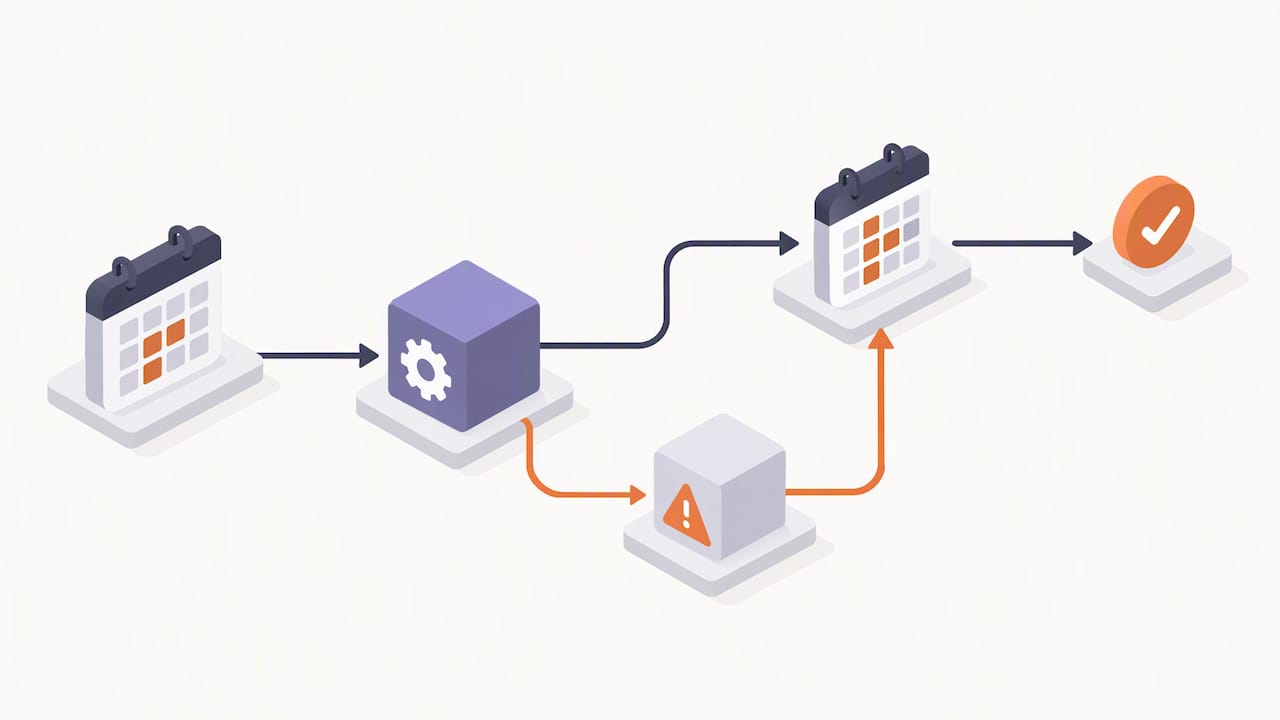
Most tools operate in one of a few recognizable patterns, and knowing which one you’re dealing with changes how you evaluate it. Calendar-sync scheduling reads interviewer availability and proposes open windows automatically, cutting out the manual back-and-forth of checking five calendars by hand. Self-scheduling links flip that model: a candidate picks a slot from a pre-approved range, no recruiter in the loop until confirmation. Conversational AI layers a chat interface on top of either approach, letting a candidate ask for a different time in plain language rather than clicking through a calendar grid.
Panel and group interviews complicate all three. A single-slot panel needs every interviewer free at once, while a multi-day sequence (phone screen, then technical round, then final) has to chain bookings without creating dead time for the candidate.
Calendar sync builds suggested times from real-time availability, not static office hours.
Self-scheduling links shift the booking decision to the candidate within rules you set.
Panel scheduling either locks one shared slot or sequences several rounds across days.
Buffers, reminders, and interviewer caps keep the system from overbooking anyone.
How the systems connect behind the scenes
The mental model is a chain: your applicant tracking system (ATS) holds candidate and job data, the scheduler sits in the middle, calendars supply availability, and video conferencing tools generate the meeting link once a time is locked. Most platforms request calendar access that is limited to free/busy status rather than full event detail, which matters for privacy since the scheduler doesn’t need to read the contents of your meetings, only whether a slot is open. Greenhouse’s documentation describes this permission model clearly: automated scheduling suggests times within a defined window, respects candidate-submitted availability, and honors interviewer working hours and existing busy blocks.
The matching logic typically weighs four inputs:
Interviewer availability windows pulled from the connected calendar.
Current interviewer load, so no one gets stacked with back-to-back panels.
Candidate preferences or submitted time ranges.
Time zone differences, converted automatically rather than left to manual math.
Once a time is confirmed, the system writes the invitation to both calendars, attaches video conferencing details, and often pushes an interview kit (role context, questions, scorecards) into the invite itself.
Pro Tip: Connect the primary work email to your scheduler, not an alias or subaddress; Greenhouse support notes that mismatched addresses are a common source of sync failures.
What this actually buys HR and recruiting teams
The clearest wins show up in three places: the hours a recruiter spends coordinating, the rate at which candidates actually show up, and how fast a requisition moves from first screen to offer. Automated reminders and one-click rescheduling links reduce the number of candidates who simply forget or lose track of a confirmation email. Faster scheduling also compresses the whole funnel, since every day a candidate waits for a slot is a day a competing offer can beat you to it.
Recruiter coordination hours drop when calendar matching replaces manual email threads.
No-show rates fall when reminders and self-service rescheduling are built into the flow.
Time-to-offer shortens because scheduling stops being the bottleneck between stages.
Candidate experience improves when booking feels like picking a restaurant reservation, not negotiating a meeting.
Vendor support documentation shows automated scheduling tools are built to avoid double-booking by checking interviewer limits and existing calendar conflicts before suggesting a time, which is the mechanical reason coordination time falls once the rules are configured correctly.
A rollout roadmap that won’t blow up your calendars
Treat this as a sequence, not a single deployment event.
Scope the problem. Count your monthly interview volume and break it down by type (phone screen, panel, technical, final) so you know which stage needs automation most.
Prepare the connections. Grant calendar access using the primary work email for every interviewer, confirm ATS integration credentials, and document who has admin rights to change rules later.
Pilot on one team. Pick a single role or department, define two or three success metrics up front, and test how the system handles time zones and multi-person panels before anyone else touches it.
Roll out with training. Give interviewers a short walkthrough, set default buffer times between meetings, and build an escalation path for when a slot needs manual override.
Measure and adjust. Track time-to-schedule and no-show rate on a regular cadence, then tighten interviewer caps or templates based on what the pilot data shows.
Pro Tip: Start the pilot small enough that a bad week doesn’t become a company-wide complaint; Greenhouse recommends testing on a single team before wider rollout for exactly this reason.
A checklist for evaluating features and integrations
Skip the brand comparisons and focus on what the system needs to do inside your actual stack. Self-scheduling links, multi-panel coordination, and built-in rescheduling flows are table stakes at this point, not differentiators. Integration coverage matters more: a tool that can’t talk to your ATS or sync both Google and Outlook calendars will create more manual work than it removes.
Confirm native integration with your ATS, not a workaround built on exported spreadsheets.
Check both Google and Outlook calendar sync, plus whatever video conferencing tool your teams already use.
Look for single sign-on or SCIM support if your IT team requires centralized access control.
Require admin controls for interviewer caps, manual override rules, and exportable reporting.
Review the vendor’s security posture before signing anything, including registry listings like the Cloud Security Alliance STAR registry, which publishes security posture disclosures for participating vendors.
Where rollouts usually go wrong
The most common failure isn’t the software itself, it’s the permissions and defaults nobody configured carefully. Over-granting calendar access (full event detail instead of free/busy) creates privacy friction that interviewers notice fast. Ignoring interviewer capacity limits means your best technical lead ends up double-booked by week two, and generic default templates that skip the interview kit leave candidates walking into rooms with no context.
Set calendar permissions to free/busy only unless there’s a specific reason for more.
Define interviewer caps before launch, not after someone complains about back-to-back panels.
Require interview kits in every invite template so no one improvises on the fly.
Build a manual fallback process for exceptions like last-minute reschedules or VIP candidates.
Time zones deserve their own line of attention. A candidate booking what looks like a 2 p.m. slot can end up an hour off if the system doesn’t convert correctly, and that’s a bad first impression before the interview even starts.
Pro Tip: Keep a documented manual process alongside the automated one; even a well-configured system will hit edge cases that need a human to sort out.
How BRDGIT supports teams that need hands-on help
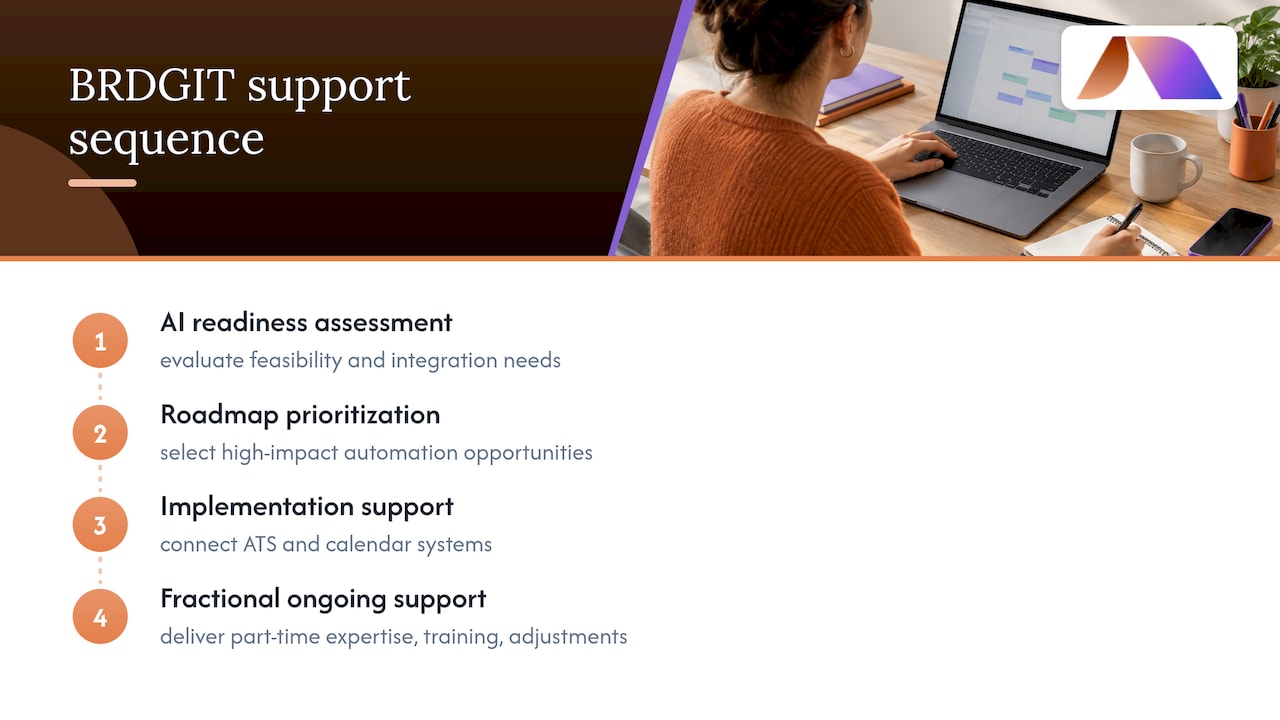
Not every HR team has the internal bandwidth to map integrations, test permission models, and train interviewers on a new system while still running a full req load. Some companies work with AI consulting services through a practical sequence: an AI readiness assessment to understand what’s feasible, a roadmap prioritizing the right automation opportunities, implementation support to connect ATS and calendar systems, and ongoing fractional support once the system is live. For teams that need AI expertise without adding a full-time hire, some firms provide experienced AI talent on a fractional basis, covering planning, delivery, and ongoing adjustments that keep a scheduling rollout from drifting back into manual chaos. This approach also extends to building custom workflows and training staff to use new systems with confidence rather than quiet resistance.
Why incremental pilots beat big-bang rollouts
The appeal of automating scheduling all at once is obvious and the risk is just as real: a system configured wrong on day one teaches interviewers to distrust it permanently. A narrow pilot, measured honestly against a couple of clear metrics, tells you more in three weeks than a full rollout tells you in three months. Interviewer experience deserves the same attention as candidate experience, since a scheduling tool that frustrates your panelists will quietly get worked around. Measure, adjust, then scale.
— Team BRDGIT
Getting started with BRDGIT on scheduling automation
If your team is weighing whether to build this internally or bring in help, an AI readiness assessment can be a reasonable starting point: it looks at your current ATS and calendar setup and identifies where automation will actually save time versus where it will just add complexity.
From there, specialized services can handle the integration work itself, and fractional engineer support can give you ongoing access to engineering assistance without a full-time hire, useful once the pilot is live and needs adjusting. For background on what automated scheduling tools generally cover before you scope a project, this overview of automated scheduling software is a useful primer. Start with a readiness conversation at Brdgit and see what a focused pilot could look like for your team.
FAQ
What is a good scheduling tool for interviews?
A good tool connects directly to your ATS and calendar system, supports self-scheduling and panel coordination, and gives admins control over interviewer caps and buffers. Review sites like Capterra’s shortlist are a useful starting point for comparing feature sets across vendors before you commit to a pilot.
What is the 30-60-90 rule in an interview?
The 30-day rule is a planning framework candidates and hiring managers use to outline goals for a new hire’s first month on the job. It’s a hiring and onboarding tool, not a scheduling automation feature, though some ATS platforms include templates for it.
What is the 80/20 rule in interviewing?
The rule in interviewing generally refers to the idea that a small portion of interview questions or signals tend to predict the majority of hiring outcomes. Definitions vary by source, so treat it as a general heuristic rather than a fixed formula.
What are the 5 C’s of interviewing?
The 5 C’s is a framework some recruiters use to evaluate candidates, though the exact five traits vary depending on the source (common versions include competence, character, communication, culture fit, and commitment). There’s no single standardized definition, so check how a specific employer or framework defines it before applying it formally.



