


Published on
Internal ChatGPT for Companies: IBM’s 13% Breach Warning
An internal ChatGPT is worth building, but only if governance and identity access management (IAM) are in place before the first employee logs in. NIST’s generative AI profile and IBM’s 2025 breach findings point the same way. Start with an AI readiness assessment or a scoped pilot, and bring in BRDGIT if you want a managed path.
TL;DR:
Start with internal knowledge search over public or redacted material; defer CRM assistance and contract summaries until access controls have been tested.
At retrieval, enforce source permissions, log the documents behind each answer, and test the same question with manager and new hire accounts.
IBM found that 13% of organizations reported breaches involving AI models or applications; among those reporting AI breaches, 97% lacked proper AI access controls.
Limit the pilot to one team and one approved source, track response time, ticket deflection, and drafts per hour saved, and define rollback criteria.
BRDGITPlan a Safer Internal AI PilotBRDGIT helps teams assess AI readiness, identify suitable opportunities, and build roadmaps for secure implementation and ongoing support.Explore BRDGIT’s AI support
Table of Contents
Which internal ChatGPT use cases should you start with?
How should the data architecture work: RAG, connectors, and access control?
What belongs on your security and governance checklist?
Which deployment option fits: workspace, enterprise, API, or managed build?
How do you roll out an internal ChatGPT safely?
What does ongoing operation and monitoring involve?
BRDGIT perspective: a managed path from assessment to fractional engineering
Editorial take: security is the product, not the add-on
How BRDGIT can help you deploy an internal ChatGPT securely and quickly
FAQ
Sources
Which internal ChatGPT use cases should you start with?
Pick pilots where the payoff is visible and the data is low risk. We rank use cases by how much sensitive data they touch, because that decides how fast you can move.
Internal knowledge search: employees ask questions and get answers drawn from policies, wikis and handbooks.
Helpdesk automation: the assistant resolves repetitive IT and HR questions before a ticket is opened.
Document summarization: long contracts, meeting notes and reports become short briefs.
Sales and CRM assistance: call notes become drafted follow-ups and account summaries.
Process automation: routine intake, routing and status updates move out of inboxes.
Knowledge search over public or redacted material can be a lower-risk starting point. CRM assistance and contract summarization expose customer and legal data, so they come second, once access controls are proven.
Most AI-related breaches trace to missing access controls: IBM reported that 13% of organizations had breaches involving AI models or applications, and the lesson is to gate data before you scale usage.
Measure each pilot with a few plain KPIs: average response time, ticket deflection rate, and drafts completed per hour saved. A good first scope is one team, one knowledge source, and a few weeks of tracked results.
How should the data architecture work: RAG, connectors, and access control?
Many company assistants use retrieval-augmented generation, or RAG. Instead of relying only on the model’s memory, the system can search approved documents and use relevant results to inform its answer. This can help tie answers to company sources and make them easier to audit.
Connectors feed that search. Typical ones include:
Confluence and SharePoint: policies, project pages and shared documents.
CRM systems: account history, deal notes and customer communications.
Ticketing tools: past resolutions that help the assistant answer new requests.
You also choose a sync pattern. Real-time indexing can keep answers current, while periodic indexing may suit content that changes slowly. Choose a sync pattern based on how current the information needs to be and the system’s operational requirements.
The rule that matters most: enforce authorization at the retrieval layer. If a user cannot open a document in the source system, the assistant must not retrieve it for them. Log which sources supported every answer so you can trace any response back to its origin.
Pro Tip: Test access with two accounts on day one. Ask the same question as a manager and as a new hire, and confirm the answers differ exactly as your permissions say they should.
What belongs on your security and governance checklist?
Start from the NIST AI Risk Management Framework, which organizes suggested actions into four functions: Govern, Map, Measure and Manage. In practice, that translates into a short list of owned tasks.
Govern: name an accountable owner, publish an acceptable-use policy, and set an approval process for new AI tools.
Map: document where data comes from, who uses the assistant, and which uses carry the most risk.
Measure: test outputs before launch for accuracy, leakage and bias, and keep testing afterward.
Manage: assess third-party suppliers, track incidents, and define when to roll a feature back.
IAM integration: connect single sign-on through SSO/SAML, automate user lifecycles with SCIM, assign role-based permissions, and give AI agents their own non-human identities with tight scopes.
97% of organizations that reported AI-related breaches lacked proper AI access controls, according to IBM’s 2025 findings. Identity is an important control.
Shadow AI is the other half of the problem. IBM analysts describe it as a cultural issue: people reach for unapproved tools when sanctioned ones are missing. Detection and policy help, but a good internal assistant removes the reason to go around you. Training closes the gap, and practical security awareness topics such as phishing and human-risk modules fit well into that effort.
Pro Tip: Give every AI agent its own credentials with the narrowest scope that works, never a shared admin account.
Which deployment option fits: workspace, enterprise, API, or managed build?
There are several realistic routes, and the right one depends on how much control and speed you need.
Self-serve workspace: ChatGPT Business gives teams a shared workspace with admin controls, centralized billing and company knowledge features. It can be a quick way to start.
Contracted enterprise plan: vendor documentation describes Enterprise as adding advanced governance, service levels and custom legal terms.
API-based custom agents: your engineers build the assistant around your own data and workflows. You gain control and take on the maintenance.
Managed or consulting-led build: an outside team designs, builds and supports the system with governance included from day one.
The trade-offs are predictable. Self-serve plans can deliver value quickly but may offer fewer contractual privacy protections. Enterprise terms may provide additional protections, along with a longer procurement process. Custom builds fit your exact connectors but need ongoing engineering.
Bring in managed help or fractional engineers when you face complex connectors, strict compliance duties, or no spare engineering capacity. Contract engineering firms such as Odesa are one option for building custom connectors.
How do you roll out an internal ChatGPT safely?
Treat the rollout as a sequence, not a launch date. We recommend this order:
Run a readiness assessment. Inventory data sources, map stakeholders, tier risks by sensitivity, and list compliance needs.
Scope a narrow pilot. Choose one team, one use case, and one approved knowledge source.
Gate the data. Connect only content the pilot group is allowed to see, and confirm permissions pass through to retrieval.
Set success and rollback criteria. Define the KPIs from the use case stage and the conditions that pause the pilot.
Train by role. Teach the acceptable-use policy, show what good prompts look like, and explain what never goes in.
Open a reporting channel. Make it easy to flag wrong or strange outputs, and reward people who use the sanctioned tool.
Leadership alignment matters as much as the tooling. Executive resilience planning is a useful companion when leaders worry about what AI means for their teams.
Pro Tip: Publish a one-page “what the assistant can and cannot see” note to pilot users. It cuts support questions and builds trust quickly.
What does ongoing operation and monitoring involve?
An internal assistant is a living system. Keeping it safe takes a small set of recurring habits.
System inventory: record model versions, data sources, connectors and agent identities, and update it with every change.
Logging: capture prompts, retrieval provenance and access events, and watch for unusual patterns such as bulk queries.
Regular audits: review permissions, test for confabulation, and spot-check answers against source documents.
Vendor reassessment: revisit supplier terms and security posture on a fixed schedule, as the AI RMF Playbook encourages for third-party systems.
Incident playbook: write down who is notified, how access is suspended, and how affected users are told.
Keep the playbook short enough that someone can follow it at any hour.
BRDGIT perspective: a managed path from assessment to fractional engineering
We start with an AI Readiness Assessment, move to an AI Blueprint that sets priorities and guardrails, then build with a Custom Agent Build. After launch, our Managed AI Support and fractional engineers keep the system maintained. A hands-on partner can help teams move toward safe value.
Editorial take: security is the product, not the add-on
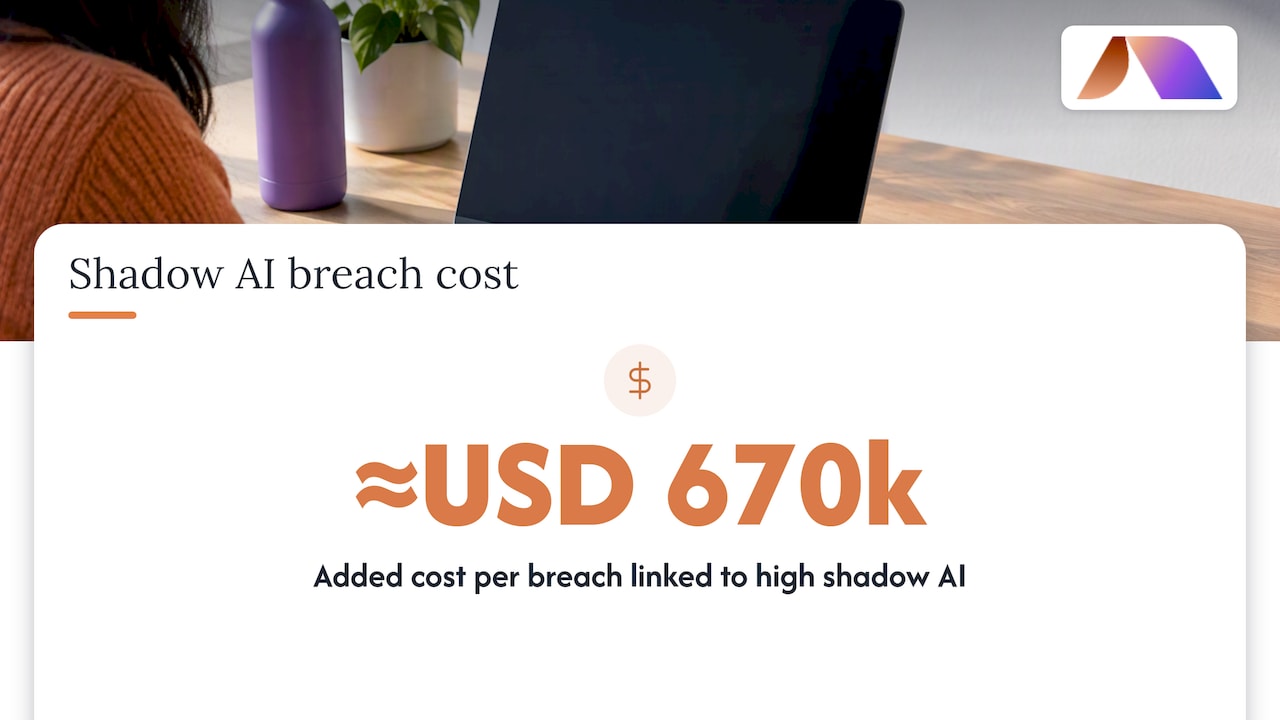
Most advice treats the model as the main decision and security as a review at the end. We read the evidence the opposite way. The model is only one consideration, while the retrieval layer, identity setup and policy also play important roles. IBM’s analysis links high levels of shadow AI to roughly USD 670,000 in added cost per breach, which tells us that doing nothing is also a choice with a price.
Conventional guidance falls short in a second way: it tells employees what to avoid without giving them something better. A sanctioned assistant that is fast and useful does more for security than a stricter policy memo.
Prioritize in this order: fix identity and permissions, pick one low-risk use case, prove the controls hold, then expand. Skipping a step is a mistake that enthusiasm alone cannot correct later.
— Team BRDGIT
How BRDGIT can help you deploy an internal ChatGPT securely and quickly
If you want a governed pilot without building the expertise in-house, we can take it from assessment to a working assistant.
AI Readiness Assessment: a clear view of your data, risks and best first use case.
AI Blueprint: a roadmap for AI priorities.
Custom Agent Build: a custom AI assistant.
Fractional Engineer Services: experienced engineers who maintain and extend the system as usage grows.
You get practical support for pilots and hands-on staff training. Current prices are on our website. Start with an AI Readiness Assessment or talk to us about fractional engineering and we will scope your first pilot with you.
FAQ
How does ChatGPT Enterprise work for companies?
ChatGPT Enterprise is a contracted plan that adds governance, service levels and custom legal terms on top of the team workspace. Vendor documentation separates it from the self-serve Business plan. Features such as company knowledge connectors vary by plan.
How is artificial intelligence used in business?
Companies use AI for knowledge search, helpdesk answers, document summaries, sales support and workflow automation. The strongest results come from narrow, measured use cases tied to clear KPIs. Governance and access controls decide whether those gains are safe to keep.
How does AI affect internal communications?
AI shortens the path from question to answer by searching company sources and drafting summaries or replies. It can also spread errors faster if answers are not tied to verified documents. Logging provenance and keeping permissions strict keeps communication trustworthy.
Is ChatGPT a bot or AI?
ChatGPT is an AI system that works as a conversational chatbot. The AI is a language model that generates responses, and the chat interface is the bot layer people interact with. An internal version adds your data, permissions and policies around it.



